
Key takeaways
What this article covers, in order:
- Key takeaways
- Why sales tax automation matters for small businesses in the United States
- What should sales tax look like in your accounting records?
- How does sales tax automation work for a small business?
- Where small businesses usually make sales tax errors
- What does correct recording look like from invoice to bank reconciliation?
Sales tax automation in the United States helps small businesses record sales tax correctly at every step, from the invoice to the bank deposit and the final return. Done well, it reduces manual errors, keeps revenue and tax separate, and makes reconciliation much faster.
Key takeaways
- Sales tax should be recorded as a liability, not as revenue.
- The clean process is invoice, payment, bank match, adjustment, and filing.
- Automation works best when tax codes, products, and customer setup are consistent.
- Bank reconciliation is where many sales tax errors become visible.
- Small businesses should review exceptions, refunds, and discounts regularly.
- This article is general information, not tax or legal advice.
Why sales tax automation matters for small businesses in the United States
If you run a small business in Chicago, Houston, or Detroit, you likely already collect sales tax on some sales. The hard part is not only charging the right amount. The hard part is recording it correctly in your books every time.
Many small businesses still use spreadsheets or rely on manual entries in QuickBooks. That often creates three problems. First, sales tax gets mixed into income. Second, payments from Stripe or bank deposits do not match open invoices cleanly. Third, month-end cleanup takes too long.
Sales tax automation solves those issues by creating a repeatable flow. The software records the sale, separates tax from revenue, applies the customer payment, and helps you reconcile the bank activity without double counting tax. Good automation also makes it easier to trace what happened when you issue a credit note, refund a customer, or receive a partial payment.
For growing businesses, that control matters. Buyers, lenders, and outside accountants want clean books. They expect your balance sheet to show sales tax payable accurately. If your liability account is wrong, your cash position and profit can look wrong too.
This is why many teams look for accounting software in the USA that reduces manual sales tax work while keeping the records audit-ready.
What should sales tax look like in your accounting records?
Sales tax collected from customers is usually not your revenue. It is money you collect and hold until you remit it to the state or local authority. In your books, that amount should sit in a liability account, often called sales tax payable.
Here is the basic accounting logic:
- Product or service amount goes to revenue.
- Sales tax amount goes to sales tax payable.
- Total invoice equals revenue plus tax.
- Customer payment clears accounts receivable.
- Later, tax payment reduces the liability.
A simple example:
A bakery in Houston invoices a wholesale customer for $1,000 of taxable goods and charges $82.50 of sales tax. The invoice total is $1,082.50.
A clean entry would look like this:
- Debit accounts receivable: $1,082.50
- Credit revenue: $1,000.00
- Credit sales tax payable: $82.50
When the customer pays:
- Debit bank or undeposited funds: $1,082.50
- Credit accounts receivable: $1,082.50
When the tax is remitted later:
- Debit sales tax payable: $82.50
- Credit bank: $82.50
This structure sounds simple, but manual systems often break it. Teams may book the whole deposit to income. Or they may post the tax payment as an expense. Both are wrong and create cleanup work later.
How does sales tax automation work for a small business?
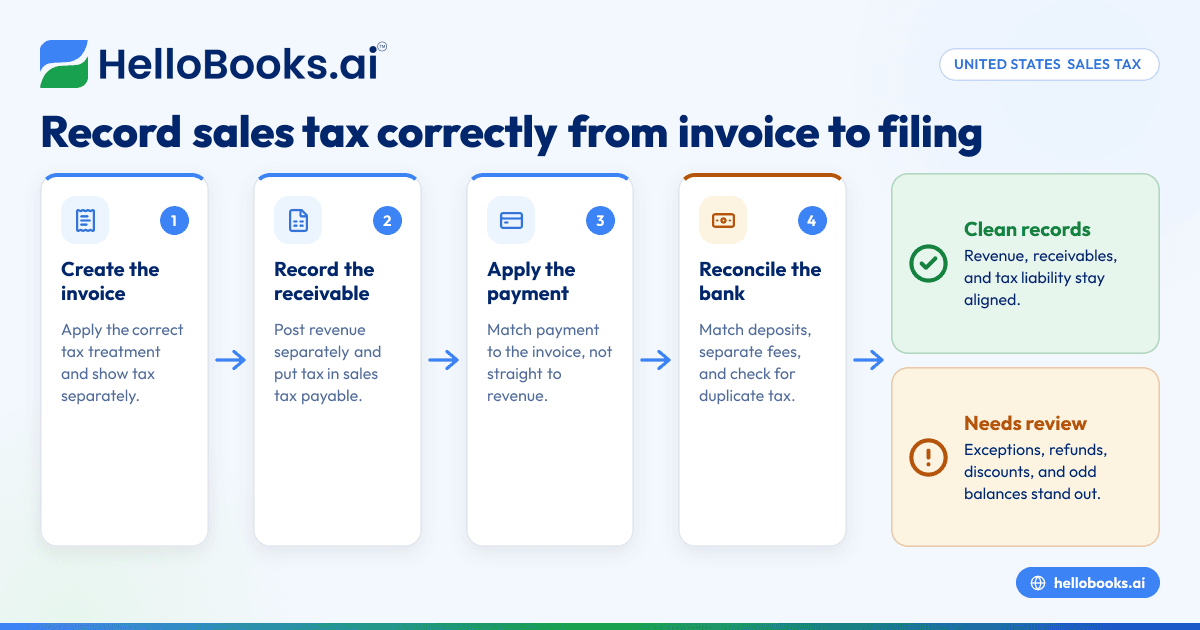
Sales tax automation records tax as a separate liability at the time of sale, then carries that amount through payment matching and bank reconciliation. The goal is simple: the invoice, the cash, and the tax liability all stay connected without manual rework.
In practice, automation is a mix of setup rules and transaction handling. The software is only as good as the data you feed it. If your products, taxability, and customer details are inconsistent, the output will also be inconsistent.
The core workflow
A small business usually needs five linked steps:
- Create the invoice
- Add the customer.
- Add the product or service.
- Apply the correct tax treatment.
- Generate the gross amount and the tax amount.
- Record the receivable
- Post the net sale to revenue.
- Post the tax to sales tax payable.
- Keep the invoice total open until payment arrives.
- Apply the payment
- Match the customer payment to the invoice.
- Handle short payments, overpayments, and fees carefully.
- Avoid posting the full bank deposit straight to revenue.
- Reconcile the bank
- Match deposits to actual payments received.
- Separate processor fees from customer receipts.
- Confirm that tax was not duplicated or omitted.
- Prepare for filing
- Review taxable sales, exempt sales, credits, and refunds.
- Confirm the liability balance agrees to your transaction history.
- Export clean reports for your accountant or filing process.
This is where AI bookkeeping can help. Instead of manually coding every transaction, the system can learn patterns, suggest matches, and flag exceptions that need review. In the sales tax context, ai sales tax workflows are most useful when they prevent tax from being buried inside a lump-sum deposit.
Where small businesses usually make sales tax errors
Most sales tax problems are not caused by complex accounting. They are caused by small process gaps that repeat every week.
1. Recording gross sales as revenue
This is the most common issue. A business sees a bank deposit of $5,430 and posts the full amount to sales. If that deposit includes sales tax, revenue is overstated and the liability is understated.
2. Ignoring payment processor fees
If you use Stripe or another processor, the amount that hits your bank may be net of fees. Your customer may have paid $1,082.50, but only $1,050.10 reaches the bank after fees. If you match only the bank amount, the invoice can stay partially open or the fee can disappear.
3. Mishandling refunds and credit memos
When you issue a refund, the tax portion should also be reversed if applicable. If your books reduce revenue but do not reduce the tax liability, you may overstate what you owe.
4. Using too many manual journal entries
Journal entries can fix issues, but they often hide the source transaction. That makes future review harder. It is better to correct the invoice, payment, or bank match when possible.
5. Failing to review exempt customers
If a customer should not be charged sales tax, the setup must be correct before invoicing. Manual overrides create inconsistency and make reports less reliable.
What does correct recording look like from invoice to bank reconciliation?
Correct recording means each transaction tells one clear story: what you sold, what tax you collected, what the customer paid, and what finally reached the bank. If those pieces line up, your revenue, receivables, and sales tax payable all make sense.
Step 1: Set up products and tax treatment clearly
Start with your item list. Every product or service should have a clear tax setting. Avoid vague names like "misc fee" or "service package" unless your team knows exactly how to code them.
Good setup includes:
- A clean product and service list
- Consistent revenue accounts
- Defined tax treatment by item
- Clear customer records
- A separate sales tax payable account
This is also where AI accounting software can reduce repetitive setup mistakes by standardizing coding rules across invoices.
Step 2: Create invoices that separate sales tax from revenue
Your invoice should show the pre-tax amount, the sales tax amount, and the total. In the ledger, the net sale should post to income and the tax should post to a liability.
If you only track the total amount due, you lose visibility. That makes it hard to answer simple questions later, such as:
- How much tax did we collect this month?
- How much of this deposit is actual revenue?
- Why does our liability account not match the return?
Step 3: Record customer payments without losing detail
When payment arrives, apply it to the open invoice. Do not post the payment directly to revenue. The invoice already recorded revenue and tax. The payment should clear receivables only.
If your customer pays through Stripe, also track fees separately. For example:
- Customer payment: $1,082.50
- Processor fee: $32.40
- Net bank deposit: $1,050.10
Your books still need to show that the customer paid the full invoice. The fee is a separate expense. The tax liability remains based on the invoice, not the net deposit.
Step 4: Reconcile the bank using the payment trail
Bank reconciliation is where everything either works or breaks. Your bank feed shows cash movement, but cash movement alone does not explain revenue or tax. The match should connect the bank deposit to the customer payment, not create a second sale.
A strong reconciliation process includes:
- Review each deposit.
- Match it to customer payments or grouped settlements.
- Record fees separately.
- Investigate unmatched balances.
- Confirm no duplicate revenue was created.
This is exactly why businesses adopt bank reconciliation software. It helps your team match deposits faster and spot exceptions before month-end.
Can AI help with sales tax and bank reconciliation?
Yes, but only if your source data is clean. AI can suggest tax treatment, detect likely matches, and flag unusual entries, but it cannot fix a messy chart of accounts or inconsistent invoice habits by itself.
In real use, AI helps in three areas.
Transaction classification
The software can recognize recurring payment patterns, processor fees, and typical invoice structures. That cuts down on manual coding.
Match suggestions
When one bank deposit relates to several invoices, automation can suggest likely matches based on amount, date, and customer behavior. This is useful for businesses with high transaction volume.
Exception review
AI is best used to surface what needs attention. Examples include:
- tax collected on a customer marked exempt
- a refund posted without reversing tax
- a deposit recorded as revenue instead of payment
- a liability balance that moves in an unusual way
The goal is not to remove human review. The goal is to reduce routine work so your team focuses on exceptions.
A practical monthly process for sales tax automation
Small businesses do best with a simple close routine. Do not wait until filing time to discover problems.
Weekly tasks
- Review new invoices for tax accuracy.
- Apply customer payments to open invoices.
- Match bank deposits and processor settlements.
- Post fees and refunds correctly.
- Resolve unmatched transactions while they are fresh.
Month-end tasks
- Run a sales tax liability report.
- Compare invoice totals to payment activity.
- Review credit memos and refunds.
- Confirm exempt sales are documented.
- Investigate negative or unusual tax balances.
Before filing
- Review the period dates carefully.
- Tie the liability account to the detail report.
- Confirm prior-period adjustments are understood.
- Keep support for exemptions, credits, and refunds.
- Share reports with your accountant if needed.
If your current process lives in spreadsheets, switching to accounting software for small business can make this monthly review far more manageable.
How should you choose software for sales tax automation?
Look for software that helps you keep the transaction trail intact. The right system should support invoicing, payment recording, bank matching, expense recording, and reporting in one place.
Features that matter most
- Separate tax from revenue automatically
- Clean invoice and payment workflows
- Strong bank matching tools
- Clear audit trail
- Easy review of refunds and adjustments
- Useful reports for your accountant
Some teams start by improving invoicing first. If that is your bottleneck, invoice software can help standardize the front end of the process before you tackle the full month-end workflow.
Questions to ask before you buy
- Will this reduce manual journal entries?
- Can my team review exceptions quickly?
- Will it help us handle processor fees correctly?
- Can we trace a bank deposit back to invoices?
- Does it produce reports we can actually use at filing time?
The best tool is not the one with the most features. It is the one your team will use consistently.
When should a small business clean up its sales tax process?
Now is the right time if any of these sound familiar:
- You book deposits straight to sales.
- Your accountant makes frequent sales tax corrections.
- Your liability account changes in ways you cannot explain.
- Refunds and credits are handled manually.
- Reconciliation takes days at month-end.
A cleanup project does not need to be huge. Start with one month. Trace ten invoices from creation to payment to bank deposit. If the trail is hard to follow, your process needs work.
For many businesses, the quickest win is to standardize expense and fee coding alongside invoice matching. That is where expense management software also helps, because payment fees and business spending often sit next to customer receipts in the bank feed.
Final thoughts
Sales tax automation in the United States is really about accounting discipline supported by better software. When invoices, payments, and bank reconciliation are connected properly, sales tax becomes easier to track, easier to review, and less risky at filing time.
If you want to simplify bookkeeping, invoicing, reconciliation, and compliance in one workflow, you can book a demo or compare options on the pricing page.
Frequently asked questions
Is sales tax collected considered revenue?
Usually, no. Sales tax collected from customers is generally recorded as a liability, not as revenue. It is money your business collects and later remits, so it should not inflate sales on your profit and loss statement.
Why does bank reconciliation create sales tax mistakes?
Because the bank only shows cash movement, not the tax detail behind each sale. If a deposit is posted directly to revenue instead of matched to an invoice payment, sales tax can be overstated, understated, or duplicated.
How do refunds affect sales tax records?
If a taxable sale is refunded, the related tax often needs to be reversed in the books as well. If you reduce revenue but leave the tax liability unchanged, your records may show that you owe more tax than you actually collected.
Can small businesses automate sales tax if they still use spreadsheets?
Yes, but spreadsheets usually make the process fragile as volume grows. Automation works best when invoices, payments, and bank matches live in one system with a clear audit trail.
Do I need an accountant if I automate sales tax?
Automation reduces data entry and common mistakes, but it does not replace judgment. An accountant can still help review setup, handle edge cases, and support filing and cleanup when your records do not tie out.
Read next
This article covers one part of a bigger topic. For the complete picture, read our guide to sales tax.