
Key takeaways
What this article covers, in order:
- Table 12 असल में क्या मांगता है
- HSN और SAC में फर्क कहाँ मायने रखता है
- कितने digits report करने हैं—इसका सही source क्या है
- B2B और B2C अलग summary होने से confusion क्यों बढ़ता है
- Table 12 के columns में लोग कहाँ अटकते हैं
- Table 12 mismatch के असली कारण
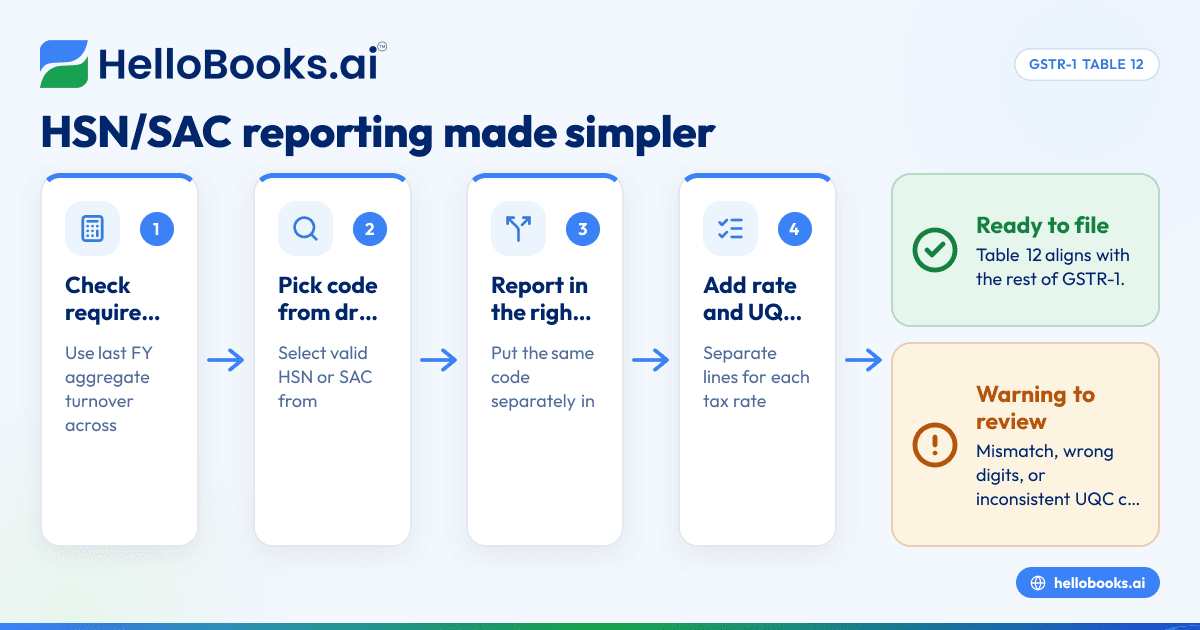
India में GSTR-1 का Table 12 आपकी outward supplies की HSN/SAC-wise summary है, और इसे सही भरने का सबसे सीधा तरीका है: invoice बनाते समय सही HSN या SAC, सही place of supply, और सही tax head split रखना ताकि बाद में GST Portal पर totals mismatch न हों. अगर Table 12 बार-बार warning दे रहा है, तो समस्या अक्सर code, UQC, rate-wise breakup, या B2B/B2C summary के मेल में होती है—ना कि सिर्फ filing के आख़िरी क्लिक में.
Table 12 असल में क्या मांगता है
GSTR-1, Central Goods and Services Tax Act, 2017 और उससे जुड़े rules के reporting framework का हिस्सा है, और इसका electronic return environment GSTN तथा GST Portal पर संचालित होता है. Table 12 में सरकार broadly यह देखना चाहती है कि आपकी period-wise sales सिर्फ party-wise नहीं, बल्कि classification-wise भी समझ में आएं: कौन-सा माल किस HSN के तहत गया, कौन-सी service किस SAC के तहत गई, taxable value कितनी रही, और उस पर IGST या CGST/SGST कितना बना.
व्यवहार में इसका मतलब यह है कि आपने महीने भर में जितने invoices बनाए, उनका data Table 4, B2C sections, debit/credit notes वगैरह में तो जाता ही है, लेकिन Table 12 उसी data को classification summary की तरह दोबारा देखता है. इसलिए अगर invoice बनाते समय item master साफ़ नहीं था, या कुछ invoices में HSN छोड़ा गया, या कुछ में service को goods की तरह और कुछ में goods को service की तरह map कर दिया गया, तो Table 12 तुरंत परेशानी देता है.
HelloBooks में जब आप GST invoice बनाते हैं, तो item level पर HSN/SAC, customer GSTIN, और place of supply के आधार पर CGST/SGST या IGST split consistent रहता है. यही consistency बाद में GST return filing के समय Table 12 को बाकी GSTR-1 से मिलाने में मदद करती है.
HSN और SAC में फर्क कहाँ मायने रखता है
HSN goods के classification code हैं, जबकि SAC services के classification code हैं. India में GST compliance के लिए इनका practical महत्व CBIC की classification guidance, notifications, explanatory notes और GST Portal/GSTN की return structure में दिखाई देता है. किस supply पर कौन-सा code लगेगा, इसका official basis CBIC के प्रकाशित material, applicable notifications, tariff references और GST Portal की current filing schema में देखा जाना चाहिए.
सरल भाषा में:
- आप अगर physical goods बेचते हैं—जैसे hardware, garments, auto parts, packaged food, electrical items—तो HSN relevant होगा.
- आप अगर service दे रहे हैं—जैसे consulting, legal support, software service, repairs, restaurant service, transport support—तो SAC relevant होगा.
लेकिन Table 12 के perspective से portal को भावनात्मक फर्क नहीं पड़ता. उसे बस यह चाहिए कि जिस supply को आपने invoices में जिस nature और tax treatment से report किया है, उसकी summary सही code के नीचे बैठे.
यहीं पर गलती होती है. कई businesses Tally या किसी पुराने billing setup से item names तो migrate कर लेते हैं, लेकिन HSN/SAC master साफ़ नहीं करते. अगर आपने Tally alternative या migration route से data move किया है, तो item master की review बहुत जरूरी है. HelloBooks का Tally connector और migration setup transition को आसान बनाता है, लेकिन classification mapping का final business judgment फिर भी आपके facts पर निर्भर रहता है.
कितने digits report करने हैं—इसका सही source क्या है
यह सवाल लगभग हर taxpayer पूछता है, लेकिन इसका जवाब bare fact की तरह याद रखने के बजाय official source से verify करना चाहिए. HSN reporting में कितने digits applicable हैं, यह GST law framework, CBIC notifications/instructions और GST Portal पर current filing rules में प्रकाशित होता है. क्योंकि यह compliance requirement turnover-related conditions और notification changes से जुड़ सकती है, current requirement filing से पहले official source पर check करनी चाहिए.
इसलिए safest approach यह है:
- अपनी business category और previous financial year aggregate turnover का legal context समझें.
- PAN level aggregate turnover का concept GST law के अनुसार verify करें.
- current digit requirement CBIC notification/instruction और GST Portal help material में check करें.
- अगर doubt हो कि minimum digits से ज़्यादा report करना बेहतर है या नहीं, अपने tax professional से confirm करें.
यहाँ एक practical point है: कई businesses invoice पर detailed code maintain करते हैं, लेकिन portal summary एक specific level पर मांग सकता है. इसलिए invoicing master और filing expectation में alignment होना चाहिए.
B2B और B2C अलग summary होने से confusion क्यों बढ़ता है
Recent return design changes के बाद Table 12 को सिर्फ एक lump-sum code summary की तरह देखना काफी नहीं है. GSTN validations अब इस बात को देखते हैं कि registered recipients और unregistered recipients की reporting logic अलग sections से मेल खाए. इसलिए एक ही HSN code दो अलग buckets में split हो सकता है.
मान लीजिए—यह पूरी तरह illustrative और invented उदाहरण है, official figure नहीं—दिल्ली की एक trading firm ने एक ही महीने में HSN 7318 के goods बेचे. इनमें से कुछ invoices GSTIN वाले contractors को गए और कुछ cash/UPI counter sales unregistered buyers को. अगर invented numbers में registered buyers को ₹2,40,000 taxable value और unregistered buyers को ₹1,10,000 taxable value की supply हुई, तो Table 12 में same HSN अलग B2B और B2C breakup में बैठ सकता है. यह illustration quantity, returns, debit notes, credit notes, exemptions, और rate change complications को simplify करके दिखा रहा है.
यही वजह है कि month-end पर manual Excel summary बनाते समय mismatch आता है. अगर invoices बनाते समय customer GSTIN capture नहीं हुआ, या unregistered sale बाद में गलत bucket में चली गई, तो Table 12 और main GSTR-1 sections का मेल बिगड़ जाता है.
HelloBooks में invoice बनाते समय GSTIN, place of supply और tax head split साथ में capture होने से यह bifurcation बाद की data-entry exercise नहीं बनती. इससे smart invoicing और accounting software India वाले workflow में वही entry return basis बनती है, अलग spreadsheet नहीं.
Table 12 के columns में लोग कहाँ अटकते हैं
Table 12 का pressure सिर्फ code चुनने तक सीमित नहीं है. Real issue columns के आपसी relation में है.
1) HSN/SAC selection
अब manual typing की जगह dropdown-based selection का महत्व बढ़ गया है. इसका फायदा यह है कि typo कम होते हैं. नुकसान यह है कि अगर आपका internal item name गलत mapping पर बना हुआ है, तो portal पर सच जल्दी सामने आ जाता है.
2) Description
कई बार description auto-populate होता है, लेकिन business team internally short names से काम करती है. अगर आपके staff को item code और trade name का relation clear नहीं है, तो wrong selection हो सकता है.
3) UQC
Goods में UQC consistency बहुत अहम है. एक invoice में NOS, दूसरे में BOX, तीसरे में PCS, चौथे में KGS—ऐसी inconsistency aggregated summary को अजीब बना देती है. Services में UQC logic अलग तरह से practical होता है; portal जो structure accept करे, वही follow करना चाहिए.
4) Quantity
Quantity field में value भर देना, decimal handling गड़बड़ कर देना, या service entries में meaningless quantity डाल देना भी validation noise बनाता है.
5) Rate-wise breakup
एक ही HSN पर अलग tax treatment हो सकता है. ऐसे में single line summary हमेशा ठीक नहीं होती. Applicable breakup current GST law, CBIC notifications और GST Portal schema के अनुसार देखना चाहिए.
6) Taxable value versus invoice value
Invoice total में tax, freight treatment, discount effect, round-off, और incidental charges का असर हो सकता है. Table 12 taxable value मांगता है; gross invoice amount नहीं. इसी जगह कई businesses taxable value और tax amount का relation गड़बड़ा देते हैं.
अगर आप inventory-led business हैं, तो inventory के साथ item master discipline Table 12 को बहुत सरल बना देता है. Service-heavy businesses में consistent SAC mapping और narration discipline अधिक महत्वपूर्ण हो जाता है.
Table 12 mismatch के असली कारण
जब GST Portal या GSTN validation mismatch दिखाते हैं, तो आम तौर पर root cause इनमें से एक होता है:
- invoice में HSN/SAC blank या inconsistent था
- same item अलग-अलग spellings या duplicate masters में बना हुआ था
- B2B supply accidentally B2C bucket में चली गई या उलटा
- place of supply गलत था, इसलिए IGST बनना चाहिए था लेकिन CGST/SGST लगा
- same code पर multiple rates थीं लेकिन summary club कर दी गई
- credit note/debit note effect summary में शामिल नहीं हुआ
- UQC inconsistent थी
- amendments का असर current period summary में ठीक से नहीं बैठा
विशेषकर inter-state और intra-state confusion बहुत common है. अगर Maharashtra से Karnataka supply हुई और आपने गलती से local sale की तरह CGST/SGST लगाया, तो invoice tax treatment भी गलत होगा और Table 12 tax heads भी अजीब दिखेंगे. HelloBooks में place-of-supply logic invoice level पर काम करता है, जिससे correct IGST या CGST/SGST split maintain रहता है; यही बाद में return accuracy की नींव है.
एक छोटा invented worked illustration, ताकि logic साफ़ हो
यह पूरा उदाहरण illustrative और invented है. इसमें numbers सिर्फ समझाने के लिए हैं; यह applicable rate, digit rule, notification treatment, exempt supply, exports, advances, amendments, credit notes, cess, और sector-specific classification disputes को cover नहीं करता. Current legal position CBIC, GST law और GST Portal पर verify करनी चाहिए.
मान लीजिए Jaipur की एक firm दो तरह की outward supplies करती है:
- goods: kitchen fittings
- services: installation service
इन्होंने एक महीने में invented figures के अनुसार यह कारोबार किया:
- registered dealers को goods taxable value ₹4,80,000
- unregistered retail buyers को goods taxable value ₹1,20,000
- registered customers को installation service taxable value ₹90,000
- unregistered customers को installation service taxable value ₹30,000
अब अगर goods के लिए एक HSN और service के लिए एक SAC applicable मान लें, तो Table 12 की सोच यह होगी कि:
- goods वाले code की B2B summary अलग बैठे
- goods वाले code की B2C summary अलग बैठे
- service वाले SAC की B2B summary अलग बैठे
- service वाले SAC की B2C summary अलग बैठे
अगर business ने गलती से installation charges को goods invoice line में मिला दिया, या कुछ service invoices में SAC छोड़ा, तो summary distorted लगेगी. इसी तरह अगर कुछ retail receipts bank statement में आए लेकिन invoices timely record नहीं हुए, तो outward supply summary incomplete बन सकती है.
यहीं uploaded bank statement से reconciliation मदद कर सकता है. HelloBooks में India workflow के लिए bank statement upload करके AI reconciliation किया जाता है, जिससे NEFT, RTGS, IMPS या UPI receipts को sales entries से मिलाने में manual checking कम होती है. यह live bank feed नहीं है; uploaded statement based process है. इससे bank reconciliation software वाला part books और GST data के बीच gap पकड़ने में मदद करता है.
अगर पिछले महीने गलत HSN या SAC लगा दिया था तो क्या करें
सबसे पहले panic नहीं, trail बनाइए. गलत classification की nature समझे बिना सीधे अगले महीने “adjust” करना risky है. Corrective action इस बात पर निर्भर करता है कि issue सिर्फ reporting summary का था, invoice classification का था, tax head impact पड़ा या नहीं, और amendment की current facility GST Portal पर कैसे उपलब्ध है. इसका exact treatment GST law, relevant rules, CBIC guidance और GST Portal functionality पर depend करता है, इसलिए filing से पहले current official instructions देखनी चाहिए.
Practical approach:
- affected item masters की list निकालें
- किन invoices पर wrong HSN/SAC लगा, उन्हें identify करें
- tax amount प्रभावित हुआ या सिर्फ code reporting प्रभावित हुई, यह अलग करें
- अगर e-invoice applicable business हैं, तो IRN data consistency भी देखें
- amendment path current portal instructions के अनुसार follow करें
- material exposure हो तो CA/GST practitioner से written review लें
HelloBooks में अगर invoices system से बने हैं, तो source entries से return rebuild करना manual portal editing की तुलना में cleaner रहता है. Direct GSTR-1 filing workflow का यही फायदा है: correction isolated spreadsheet में नहीं, books-backed records में होता है.
filing से पहले practical checks जो सच में काम आते हैं
Busy month-end में long checklist कोई follow नहीं करता. इसलिए short, business-friendly review ज्यादा काम आती है.
item master साफ़ है?
Duplicate items, old HSN, guessed SAC, informal names—इनको पहले पकड़िए.
GSTIN capture सही है?
B2B/B2C split की जड़ यही है. Doubt हो तो GSTIN validator से verify कर सकते हैं.
invoice field discipline है?
Tax invoice में GST, taxable value, place of supply, और item classification consistent होने चाहिए. Basic field sanity के लिए GST invoice validator उपयोगी हो सकता है.
code summary invoices से match कर रही है?
अगर आप manual summary चलाते हैं, तो filing से पहले GST reconciliation checker जैसा sanity check helpful है.
goods business में movement documents aligned हैं?
जहाँ e-way bill relevant हो, invoice data और movement data mismatch future scrutiny का कारण बन सकता है. HelloBooks में invoice से e-way bill workflow जुड़ने से repeat typing कम होती है, इसलिए e-way bill software वाला हिस्सा logistics-heavy businesses के लिए useful रहता है.
purchase-side classification पर भी नज़र है?
भले Table 12 outward supply का section हो, लेकिन inward bills में classification discipline overall GST hygiene बनाता है. OCR से purchase bills capture करने और GSTR-2A/2B reconciliation/ITC tracking से missing supplier reporting देखने पर books और returns ज़्यादा coherent रहते हैं.
HelloBooks इस काम को कहाँ आसान बनाता है
Table 12 की असली मुश्किल filing screen नहीं, upstream bookkeeping है. अगर invoices अलग app में, stock अलग register में, receipts bank statement में, और GST return Excel में संभाली जा रही हो, तो HSN/SAC mismatch लगभग तय है.
HelloBooks इस flow को एक जगह लाता है: invoice बनाते समय HSN/SAC और GST treatment capture हो, e-invoicing applicable होने पर IRN और signed QR उसी workflow में रहें, goods dispatch पर e-way bill data दोबारा type न करना पड़े, और फिर वही records GSTR-1 और GSTR-3B filing का base बनें. Multi-GSTIN businesses के लिए एक login से अलग registrations संभालना भी practical है, खासकर जब एक firm कई states में काम करती है.
अगर आपकी team mobile पर काम करती है, तो Android/iOS app से entry discipline improve हो सकता है. और Hindi, English या Hinglish में quick help चाहिए, तो Noor assistant on WhatsApp operational doubts clear करने में सुविधाजनक पड़ सकता है. Pricing details के लिए सीधे India pricing देखें या product flow समझने के लिए demo बुक करें.
आखिर में, Table 12 को filing problem नहीं, master-data problem समझिए
ज्यादातर cases में Table 12 warning का मतलब यह नहीं कि GST Portal बेवजह परेशान कर रहा है. इसका मतलब यह है कि आपके invoices, item masters, GSTIN capture, quantity units, या tax head split में कहीं inconsistency है. India में GST compliance CBIC के legal framework, GSTN system validations, और business के day-to-day billing discipline—तीनों का मेल है.
अगर आप शुरू से सही data capture करें, तो Table 12 सिर्फ एक summary बनता है. अगर शुरू से shortcuts लिए गए हों, तो वही summary headache बन जाती है. इसी कारण smart invoicing, proper classification, uploaded bank statement reconciliation, inventory discipline, और direct GST filing—ये सब Table 12 से जुड़े हुए हैं, भले surface पर section छोटा दिखता हो.