


Key takeaways
What this article covers, in order:
- Key takeaways
- Why is bank reconciliation important for small businesses in the US?
- How does AI accounting software improve bank reconciliation?
- What features should US small businesses look for in accounting software for bank reconciliation?
- How do I choose accounting software that fits my business size and needs?
- How can HelloBooks.ai help US small businesses with bank reconciliation?
Choosing the right accounting software is essential for small businesses in the United States to achieve accurate bank reconciliation. The ideal software simplifies data entry, automates matching bank transactions with book entries, and reduces errors. This helps businesses maintain clean financial records and meet compliance requirements effectively.
Key takeaways
- Accurate bank reconciliation prevents errors, fraud, and cash flow issues.
- US small businesses should consider software with features like automated transaction matching and multi-bank support.
- Integration with existing tools such as QuickBooks or Stripe makes workflows seamless.
- AI accounting software enhances reconciliation speed and accuracy by learning from past data.
- Usability, customer support, and compliance with US tax standards are important selection criteria.
- HelloBooks.ai offers automated bank reconciliation and reporting tools tailored for US small businesses.
Why is bank reconciliation important for small businesses in the US?
Bank reconciliation is the process of comparing your business’s accounting records against the bank statements. It helps identify discrepancies like missing transactions, data entry mistakes, or unauthorized activity. For small businesses, timely reconciliation ensures:
- You have the correct cash balance to make informed decisions.
- You detect bank fees or errors promptly.
- You stay compliant with IRS and state tax authorities by maintaining accurate books.
- You can provide accurate financial statements for lenders or investors.
Missed or late reconciliation can cause issues such as bounced checks, overdrafts, or inaccurate tax filings. Using robust accounting software simplifies these tasks and reduces manual effort.
How does AI accounting software improve bank reconciliation?
AI accounting software uses machine learning to automate repetitive bookkeeping tasks like categorizing expenses, matching transactions, and flagging anomalies. This reduces manual data entry and human errors.
With AI, the software learns your transaction patterns over time. It automatically pairs bank statement lines with matching invoices, bills, or expenses in your books. This speeds up reconciliation from hours or days to minutes.
Additionally, AI can highlight suspicious transactions or discrepancies requiring your attention — improving fraud detection. For busy small business owners or finance teams, this means more time focused on growing the business and less on spreadsheet corrections.
What features should US small businesses look for in accounting software for bank reconciliation?
A US business owner or accountant should prioritize these features to ensure accurate bank reconciliation:
- Automatic transaction import: The software should connect securely with your bank accounts and import transactions daily. This includes support for multiple banks if you have several accounts.
- Smart transaction matching: The tool should automatically match bank entries with invoices, bills, or expenses based on amount, date, and description.
- Customizable rules: Ability to set rules or exceptions for common transactions to avoid repetitive manual work.
- Multi-currency and multi-tax support: Useful if you work with vendors or customers in other states or countries, respecting US tax rules.
- Audit trail and reports: Clear logs and detailed reconciliation reports confirming matched and unmatched transactions.
- Integration with finance tools: Connectors for common US business applications like QuickBooks, Stripe, or CRM software.
- User-friendly dashboard: Simple interface to quickly identify transactions that need review or approval.
- Compliance capabilities: Features that help with state sales tax calculations, 1099 tracking, and IRS reporting requirements.
How do I choose accounting software that fits my business size and needs?
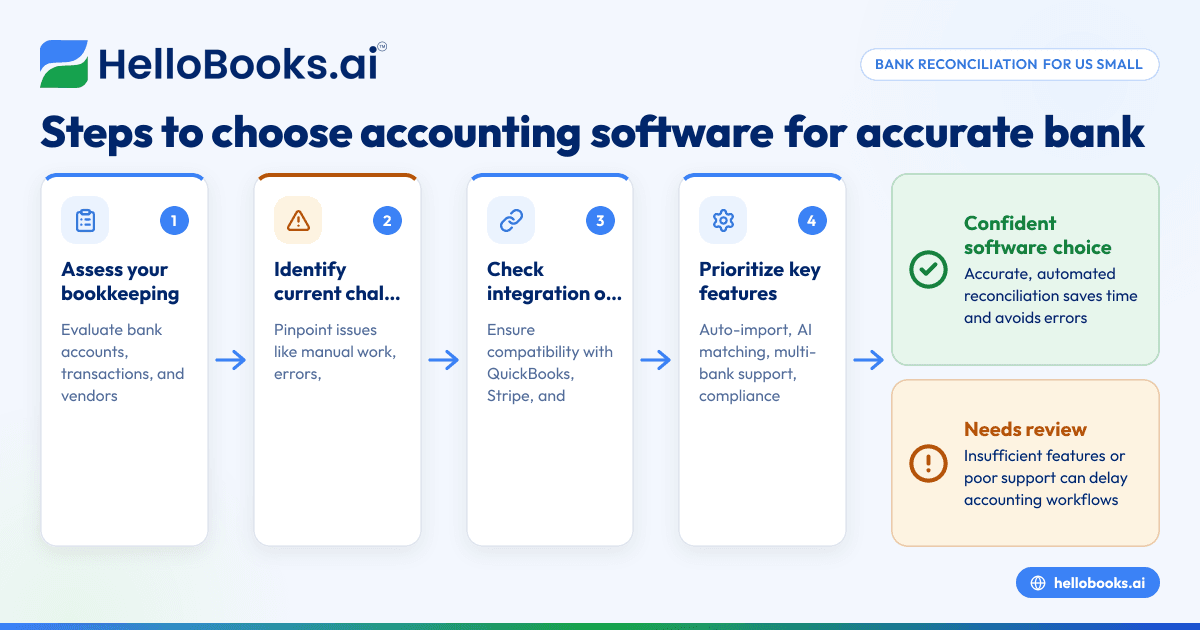
Choosing the best accounting software varies by business size, complexity, and sector. Here’s a step-by-step approach:
- Assess your bookkeeping workload: Identify how many bank accounts, transactions, invoices, and vendors you manage monthly. More complexity demands stronger automation.
- Evaluate your current accounting challenges: Are you spending excessive time on manual reconciliations? Are errors frequent? Clarify your pain points.
- Determine integration needs: Check if your software must sync with payroll, invoicing, payment processors (like Stripe), or ERP systems.
- Budget considerations: While many tools offer competitive pricing, ensure the software’s ROI is justified through efficiency gains.
- Request demos and trials: Use trial periods or demos from vendors like HelloBooks.ai to test usability and features tailored for US regulations.
- Verify customer support: Choose a provider with responsive US-based support to quickly resolve issues.
- Security and compliance: Ensure the software meets data protection standards and helps with tax compliance relevant to your state and industry.
How can HelloBooks.ai help US small businesses with bank reconciliation?
HelloBooks.ai offers automated bank reconciliation software that securely connects with multiple US bank accounts. The platform uses AI to auto-match transactions to invoices, bills, and expenses. Custom rule setting reduces manual approvals.
The solution integrates with popular US financial tools such as QuickBooks and Stripe, easing data flows. HelloBooks also handles GST and sales tax compliance support, which is customizable to US state-specific sales tax requirements, helping ensure your books stay compliant.
The platform’s dashboard highlights unreconciled transactions clearly, with instant reports to aid your year-end accounting and IRS requirements. HelloBooks.ai caters to startups and established small businesses aiming to streamline their accounting processes using modern AI-powered tools.
What are common challenges in bank reconciliation, and how does software solve them?
Manual reconciliation poses several challenges:
- Time-consuming data matching: Manually matching hundreds of transactions can take hours.
- Human error: Typos or missed items may cause inaccurate financial statements.
- Multiple bank accounts: Handling transactions across several accounts complicates coordination.
- Complex tax treatments: Applying proper tax codes, especially with different US states’ sales tax rates, is difficult to track manually.
- Detecting fraud or unusual activity: Identifying unauthorized transactions can be challenging without automation.
Accounting software addresses these by importing bank feeds automatically, using AI and rule-based matching to sync transactions correctly. It reduces errors by enforcing validation and provides audit logs for transparency. Sophisticated tools can also flag discrepancies above threshold amounts or unusual patterns using AI algorithms.
Can accounting software support my business’s tax filings and compliance?
Many accounting software packages, including AI-powered solutions, offer features to support tax compliance. These include:
- Tracking taxable versus non-taxable transactions.
- Automating state sales tax collection and reporting.
- Generating IRS-required forms such as 1099s for contractors.
- Preparing financial reports needed for tax filings.
However, accounting software is only one part of compliance. Filing deadlines and specific tax treatments depend on your business type and state. Always consult a tax professional for final submissions and legal advice.
How do I migrate my existing books to new accounting software?
Migrating to new software may seem daunting but can be simplified by following these steps:
- Export existing data: Download your current accounting records, bank statements, invoices, and bills from your old system or spreadsheets.
- Clean up records: Remove duplicates, correct errors, and confirm opening balances.
- Import data into the new system: Use provided tools or customer support for bulk import. HelloBooks.ai supports importing from common formats used by QuickBooks or spreadsheets.
- Verify transactions: Perform a trial run reconciliation before fully switching over.
- Train staff: Ensure your team understands the new workflows, especially if AI features are involved.
- Keep a backup: Retain a copy of your old data for reference during the transition period.
How will future trends in AI impact accounting software for small businesses?
AI continues to evolve, bringing more intelligent automation to accounting processes such as bank reconciliation, expense management, and fraud detection. Future developments may include:
- Advanced predictive cash flow analysis.
- Real-time anomaly detection with adaptive learning.
- Enhanced natural language querying of financial data.
- Deeper integration with banking and payment networks.
- Smarter compliance updates synced automatically with tax authority requirements.
Adopting AI accounting software early allows small businesses to improve accuracy, save time, and stay competitive in an increasingly digital economy.
If you want to see how AI can simplify your bookkeeping and bank reconciliation, book a demo with HelloBooks.ai or compare plans to find the perfect fit for your small business.
Frequently asked questions
What is bank reconciliation in accounting software?
Bank reconciliation compares your recorded transactions against your bank statements to identify discrepancies. Software automates this by matching entries, making sure your books accurately reflect your cash position.
Can AI accounting software replace my accountant?
AI software automates routine tasks and improves accuracy but does not replace professional accountants. Accountants provide expert advice, audit support, and complex tax planning that software alone cannot deliver.
How secure is accounting software that connects to my bank accounts?
Reputable accounting software providers use bank-level encryption, multi-factor authentication, and comply with data security standards to safeguard sensitive financial data.
How often should I perform bank reconciliation?
For small businesses, monthly reconciliation is the minimum recommended. More frequent reconciliations—weekly or daily—help catch issues faster, especially if you have many transactions.
Will accounting software handle state sales tax automatically?
Many solutions can calculate and report state-specific sales taxes automatically, though you must ensure your settings reflect the states where you have tax nexus.
Is there support for importing bank statements from different banks?
Yes, good accounting software supports importing bank data from multiple banks using formats like CSV or offers direct bank feeds for automatic transaction import.
Looking to automate your bank reconciliation and bookkeeping with AI? Discover how HelloBooks.ai’s AI accounting software simplifies your financial management so you can focus on growing your business. Book a demo today or check our pricing plans to get started.
Read next
This article covers one part of a bigger topic. For the complete picture, read our guide to accounting software.


