
Key takeaways
What this article covers, in order:
- Key takeaways
- What sales tax liability means in the United States
- Why does month-end close matter for sales tax liability?
- How do you track sales tax liability during month-end close?
- What reports should you compare?
- How should sales tax appear in your books?
Sales tax liability is the unpaid sales tax your business has collected from customers and still owes to state or local tax authorities. During month-end close, you track it by reconciling taxable sales, exempt sales, credits, cash received, marketplace activity, and prior payments so the liability on your balance sheet matches what your filings should show.
Key takeaways
- Track sales tax liability every month, not only when a return is due.
- Reconcile sales by jurisdiction, exemptions, refunds, and payments before you close the books.
- Keep sales tax as a liability account, not revenue and not an expense in normal cases.
- Watch for differences between your sales system, payment processor, and general ledger.
- Document your process so your controller, accountant, or auditor can follow it.
- Automation and AI bookkeeping can reduce manual errors in month-end close.
What sales tax liability means in the United States
Sales tax liability is the amount your business owes after collecting sales tax from customers on taxable sales. You collect the tax, hold it, and then remit it based on the filing schedule set by each state or local authority.
That makes sales tax different from revenue. If you sell a product for $100 and collect $8 in sales tax, your revenue is $100, not $108. The extra $8 sits in a liability account until you pay it.
At month-end, your goal is simple. You want the sales tax payable balance in your books to reflect reality as of the close date. If the balance is too high, you may overstate liabilities. If it is too low, you may understate what you owe and create filing problems later.
This matters even more for businesses that sell in multiple states, sell through marketplaces, or process a high volume of refunds. A business in Chicago might collect city and state tax on direct online orders, while a manufacturer in Houston may have a mix of taxable parts, exempt resale sales, and freight charges that need careful review. If your books are still built around spreadsheets, the risk of timing and mapping errors rises fast.
Why does month-end close matter for sales tax liability?
Month-end close is where you prove that your accounting records are complete and accurate for the period. For sales tax, that means your liability account should tie to the transactions that created the obligation.
A clean month-end process helps you:
- avoid surprises when the return is due
- catch missing exemption certificates earlier
- separate refunds from current-period collections
- identify misposted transactions
- support your numbers during audits or due diligence
If you only review sales tax at filing time, small issues stack up. A product tax code changes. A customer gets marked taxable by mistake. A refund posts to revenue but not tax. A marketplace collects tax on your behalf, but your books still show liability. By the end of the quarter, untangling it takes longer than the rest of the close.
How do you track sales tax liability during month-end close?
Start with a monthly reconciliation that ties sales activity, tax collected, and payments made to the sales tax liability account. The final liability should match what remains unpaid as of the close date.
A practical month-end routine works best when it is repeatable. If you are trying to track sales tax liability United States operations across several states, consistency matters more than complexity.
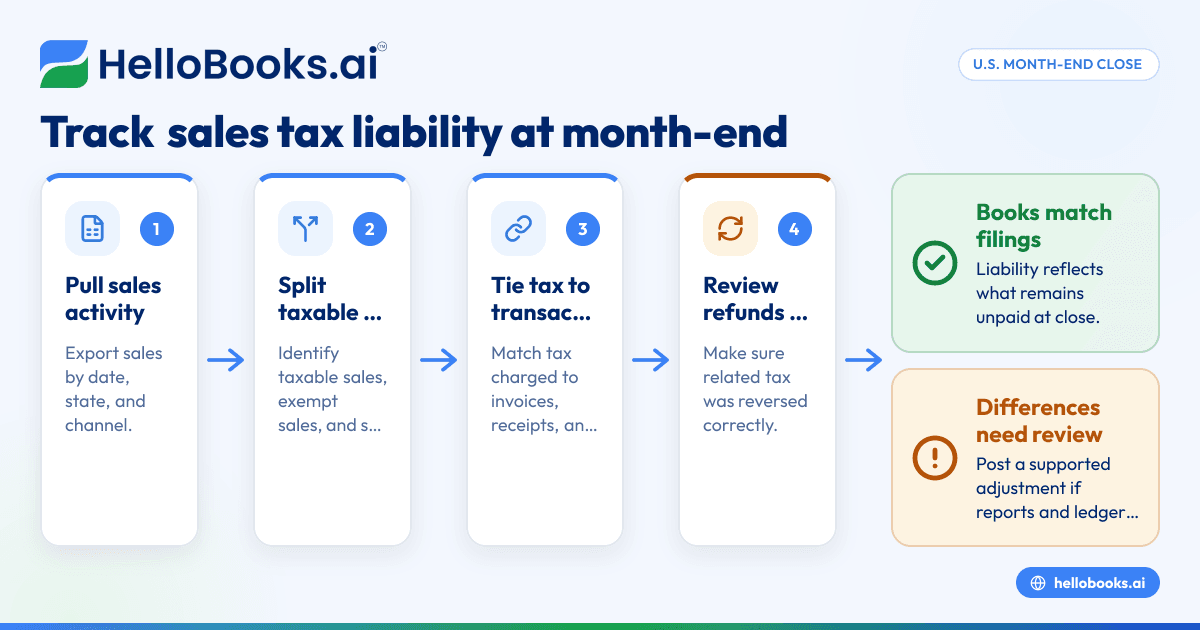
A simple 7-step month-end process
- Pull gross sales for the month Export sales by date, state, and channel from your billing, ecommerce, or ERP system.
- Separate taxable and exempt sales Identify what was taxable, what was exempt, and what documentation supports the exemption.
- Tie tax collected to invoices and receipts Confirm that tax charged on transactions matches your sales reports and your general ledger postings.
- Account for credits and refunds Review credit memos, returns, and canceled invoices. Make sure related tax was reversed correctly.
- Review marketplace and third-party collection activity If a marketplace collected and remitted tax, do not leave the same amount in your own payable account unless your setup requires a different treatment.
- Reconcile payments already made Match sales tax payments or electronic withdrawals to the liability account so prior remittances are removed.
- Book an adjusting entry if needed If your reports and ledger do not match, post a clear adjustment with support and approval.
The core accounts to review
At a minimum, your month-end review should touch these areas:
- sales or revenue accounts
- sales tax payable or sales tax liability
- cash or undeposited funds
- accounts receivable
- refund or returns accounts
- clearing accounts for ecommerce or payment processors
Most errors happen because the tax was posted to the wrong place. A team member may code sales tax into revenue. Another may book a lump-sum deposit from Stripe without separating tax from sales. The result is a liability account that no longer reflects what you owe.
What reports should you compare?
Use at least three sources. Compare your sales tax report from the billing or commerce system, your general ledger detail, and your bank or processor settlement records.
That comparison gives you a fuller picture. One report shows what should have been collected. Another shows what was posted to accounting. The third shows what cash moved.
Start with the sales tax report
Your first report should show:
- gross sales
- taxable sales
- non-taxable or exempt sales
- tax collected
- tax by jurisdiction if available
- refunds and adjustments
This report is usually closest to the operational truth because it starts from individual transactions. But it may still be wrong if product taxability settings or customer exemptions were not maintained.
Then review the general ledger
Look at activity in your sales tax liability account for the month. You should see:
- tax collected on sales
- reductions for refunds or credit memos
- reductions for payments remitted
- any manual adjustments
If you see direct journal entries with vague descriptions, pause and investigate. Manual entries are not always wrong, but they often hide process gaps.
Finally compare cash and settlement reports
Payment processors and banks can create timing differences. A sale on 03/31/2026 may settle on 04/01/2026. That is normal. Your reconciliation should focus on transaction date for accounting close, while also checking that cash movement supports the volume reported.
How should sales tax appear in your books?
Sales tax collected should usually sit on the balance sheet as a current liability until you remit it. It should not inflate revenue, and it should not normally run through the profit and loss statement as an operating expense.
Here is a simple example:
- Invoice to customer: $500 product sale
- Sales tax collected: $40
- Total invoice: $540
Your accounting entry often looks like this:
- Debit Accounts Receivable: $540
- Credit Revenue: $500
- Credit Sales Tax Payable: $40
When the customer pays:
- Debit Cash: $540
- Credit Accounts Receivable: $540
When you remit the tax:
- Debit Sales Tax Payable: $40
- Credit Cash: $40
The exact entries can vary based on your system setup, but the principle stays the same. Collected tax belongs in a liability account until payment.
What causes sales tax liability to be wrong at month-end?
The most common causes are setup errors, timing differences, and missing reversals. The longer they sit, the harder they are to fix.
1. Tax is posted as revenue
This is common in spreadsheet-driven workflows or poorly mapped imports. It overstates sales and understates liabilities.
2. Refunds reverse revenue but not tax
If a customer gets a refund, the related sales tax may also need to be reversed depending on the facts and timing. If your system misses that link, liability stays too high.
3. Exempt customers were charged tax
If a reseller or exempt organization was billed tax by mistake, you may need to fix both the invoice and your support files. Missing exemption records are a frequent source of audit risk.
4. Marketplace facilitator activity is misread
Many businesses sell direct and through marketplaces at the same time. If a marketplace collects tax on certain sales, your books must reflect that correctly. Otherwise, you may think you owe tax that was already handled through the marketplace channel.
5. Prior payments were not cleared
Sometimes the tax payment leaves the bank, but the liability account was never reduced. That makes your balance sheet show an old payable that no longer exists.
6. Journal entries bypass the source system
A well-meaning accountant may book a top-side entry to make the return tie out. That can solve one month and create confusion the next month if the root cause stays in the source data.
Can AI help ai track sales tax liability?
Yes. AI can speed up classification, anomaly detection, and reconciliations, but you still need human review for taxability, nexus, and filing decisions.
In practice, teams use automation to flag unusual tax amounts, match payments, and surface missing documentation faster. That is where AI accounting software can help reduce repetitive review during close.
Where automation helps most
Automation is useful in these tasks:
- matching invoices, payments, and tax amounts
- spotting transactions with missing tax codes
- identifying duplicate journal entries
- surfacing refunds with no tax reversal
- creating close checklists and exception reports
If you process hundreds or thousands of transactions each month, these checks save real time. They also make your month-end process less dependent on one person who understands the spreadsheet logic.
Where you still need judgment
Automation does not replace tax advice. It cannot decide every product's taxability or whether your business has filing obligations in a new state. This is general information, not tax or legal advice.
Human review is still needed for:
- state registration and filing decisions
- exemption certificate handling
- unusual transaction structures
- audit responses
- corrections that require interpretation of source documents
What should your month-end sales tax checklist include?
Use a checklist that your finance team can complete in the same order every month. Keep it short enough to use and detailed enough to stand up to review.
A strong checklist usually includes:
- Export monthly sales report by state and channel.
- Export sales tax detail report.
- Export general ledger activity for sales tax payable.
- Review taxable versus exempt sales.
- Check a sample of invoices for correct tax treatment.
- Review refunds, returns, and credit memos.
- Review marketplace-collected sales.
- Match tax payments made during the month.
- Investigate differences and post adjustments.
- Save reports and sign off the reconciliation.
Store support in one place. If your controller leaves or your CPA asks questions, the file should still make sense.
How often should you reconcile sales tax liability?
Monthly is the best practice for most growing businesses, even if you file less often. More frequent reviews help you catch issues before they affect returns and financial statements.
If you are a small business using accounting software in the USA, monthly sales tax reconciliation should be part of your standard close calendar, just like bank reconciliations and accounts receivable review.
Monthly versus filing-period review
Some owners wait until the return is due because it feels faster. It usually is not. A monthly review means you are checking one month of activity at a time. A quarterly or annual cleanup means you are reviewing several months under pressure.
Monthly review also helps with internal reporting. If you are presenting financials to lenders, investors, or board members, an overstated or understated liability can distort working capital.
A practical example from a U.S. small business
Imagine a hardware distributor in Detroit with three sales channels:
- direct invoices to contractors
- online orders through its own website
- sales through a marketplace
For April, the company records:
- $85,000 in direct sales
- $22,000 in website sales
- $18,000 in marketplace sales
Its books show $9,600 in sales tax payable at 04/30/2026. During month-end close, the finance lead reviews the detail and finds:
- $1,100 of sales were to exempt customers, but the exemption documents were missing in the system
- $420 of refunds reduced revenue, but the related tax was not reversed
- $1,300 of marketplace-collected tax was included in the payable account by mistake
- A $2,900 tax payment cleared the bank on 04/28/2026, but it was still sitting in liability
After corrections, the payable account drops to the actual unpaid balance. The close is cleaner, and the next filing is easier because the issues were resolved before the deadline rush.
This is why strong workflows matter more than perfect software. Good systems support a disciplined process. If you still manage invoicing manually, using invoice software and bank reconciliation software can reduce the number of moving parts your team has to tie out by hand.
How to improve your process if you use spreadsheets, QuickBooks, or mixed systems
Many U.S. businesses have a patchwork setup. Orders live in one system. payments in another. Accounting in QuickBooks. Tax support in folders. That can work for a while, but month-end gets harder as volume grows.
If you rely on spreadsheets
Spreadsheets are flexible, but they are fragile. Version issues, broken formulas, and manual copy-paste errors create risk. If you keep using them, lock your templates, define owners, and save support files every month.
If you use QuickBooks with manual workarounds
QuickBooks can support many small businesses, but tax tracking often gets messy when products, channels, and refunds grow more complex. The answer is not always a full system replacement. Often, it is better process design, stronger mappings, and fewer side calculations outside the ledger.
If your close still depends on exports and rework, review whether a QuickBooks alternative or broader accounting software for small business would simplify reconciliation.
If you have several disconnected tools
Map the source of truth for each data type:
- sales transactions
- tax calculation
- payment settlements
- general ledger posting
- tax payments
Then define which report wins if numbers conflict. Without that rule, close meetings turn into debates instead of reconciliations.
Controls that make sales tax close easier
Strong controls reduce errors before close starts. They also make your process easier to delegate.
Set up these basic controls:
- approval for manual journal entries to sales tax accounts
- monthly review of new products and tax codes
- validation for exempt customer setup
- documented treatment of marketplace sales
- separate review of tax payments before filing
- close checklist sign-off by preparer and reviewer
These controls matter for small teams too. A five-person finance team in Houston still needs clarity on who owns what.
If you want a simpler workflow, HelloBooks offers tools around bookkeeping, invoices, expenses, and reconciliations that can reduce manual month-end work. You can explore options on the pricing page.
Read next
This article covers one part of a bigger topic. For the complete picture, read our guide to sales tax.