
Key takeaways
What this article covers, in order:
- Why this comes up / what goes wrong
- Step-by-step
- Example (kalpanik aankde — fictional figures)
- Common mistakes
- Doing this in HelloBooks
- Frequently asked questions
GST bill banane ka process thoda technical lag sakta hai, par agar aap step-by-step sahi fields bharte hain aur important checks karte hain, toh aap easily compliant invoice bana sakte hain. Chaliye pehle samajhte hain ki yeh question kyu aata hai.
Why this comes up / what goes wrong
Chhote business owners ya accountants ko aksar confusion hota hai ki GST bill me kaunse details honi chahiye, aur kaise sahi tax rate lagana hai. Bahut log spreadsheet ya manual bill book me data dalte hain jahan baar-baar galtiyan ho jati hain, jaise wrong GSTIN, galat HSN code, ya tax rate galat lagana. Iss se GST filing me bhi dikkat hoti hai aur penalties ka risk badhta hai.
Step-by-step
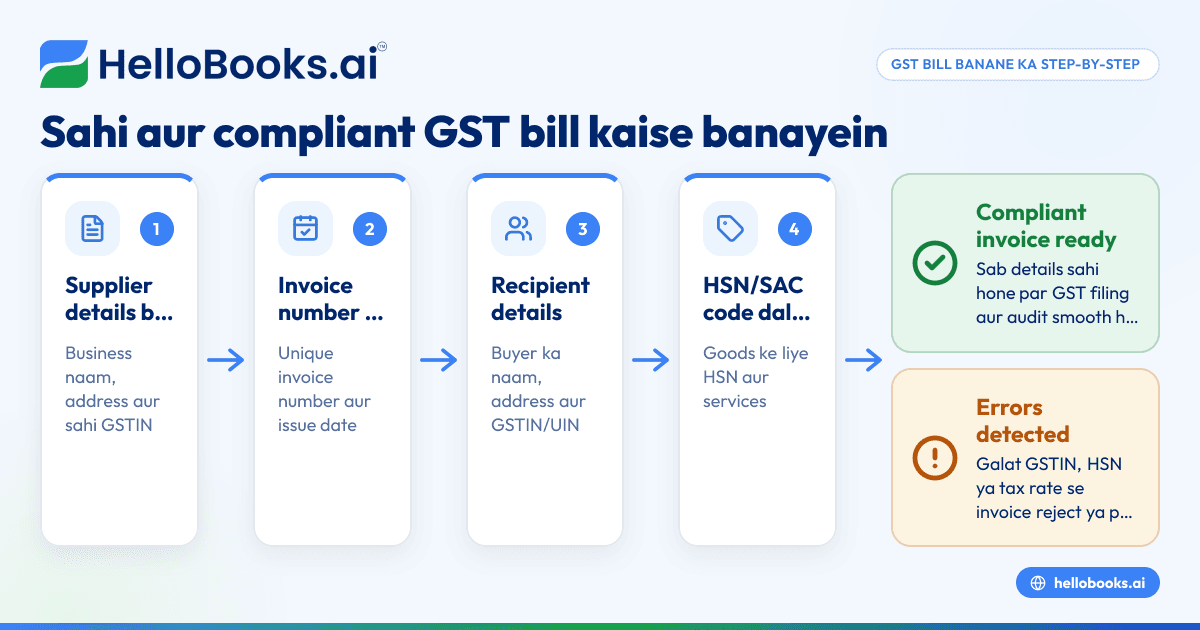
- Supplier details bharna: Apne business ka naam, address, aur GSTIN sahi likhein.
- Invoice number aur date: Invoice ka unique serial number daalein jo financial year me repeat na ho. Date invoice issue karne ki likhein.
- Recipient details: Buyer ka naam, address aur agar registered hai toh GSTIN ya UIN daalein.
- HSN/SAC code: Jo goods ya services aap bech rahe hain uska sahi HSN (goods ke liye) ya SAC (services ke liye) code dalna zaroori hai.
- Description, quantity aur unit: Product ya service ki detail, kitni quantity hai aur unit (piece, kg, litre etc.) sahi likhein.
- Total value aur taxable value: Total amount jo buyer ko dena hai, discount ke baad taxable value calculate kar ke daalein.
- GST rate aur tax amount: CGST aur SGST (agar intra-state supply hai) ya IGST (agar inter-state supply hai) ki rates daal kar tax amount calculate karein.
- Place of supply: Jahan goods ya services supply ho rahi hai us state ka naam likhein.
- Delivery address: Agar delivery place alag hai toh wo bhi mention karein.
- Reverse charge mention: Agar tax reverse charge pe pay karna hai toh uska zikr karein.
- Signature: Supplier ya authorized person ka signature ya digital signature zaroori hai.
Har step me details ko dobara cross-check karna chahiye taaki Rule 46 ke according sab details sahi ho. Agar aap software use kar rahe hain, toh yeh process aur asaan ho jata hai.
Example (kalpanik aankde — fictional figures)
Suppose ek business hai "ABC Traders" jo Mumbai me registered hai with GSTIN 27AAEPM1234F1Z9.
- Invoice number: INV-2023-001
- Date: 1 June 2023
- Buyer: XYZ Enterprises, GSTIN 27AAEPX5678G1Z5, Mumbai
- Product: LED TV
- HSN code: 852872
- Quantity: 10 pieces
- Rate per piece: ₹40,000
- Total value: ₹40,000 × 10 = ₹4,00,000
- Discount: ₹20,000
- Taxable value: ₹4,00,000 - ₹20,000 = ₹3,80,000
- GST rate (assumed): 18% (9% CGST + 9% SGST)
Calculation:
- CGST = ₹3,80,000 × 9% = ₹34,200
- SGST = ₹3,80,000 × 9% = ₹34,200
- Total GST = ₹34,200 + ₹34,200 = ₹68,400
- Invoice total = ₹3,80,000 + ₹68,400 = ₹4,48,400
Invoice me yeh sab details clearly likhni hain, aur place of supply Mumbai (Maharashtra) mention karna hai.
Common mistakes
- Galat GSTIN dalna: Buyer ya supplier GSTIN galat likhne se invoice reject ho sakta hai. Hamesha official document se check karein.
- HSN/SAC code galat select karna: Sahi code na hone se ITC claim me problem hoti hai. GST invoice validator tool ka use karein jaise GST invoice validator.
- Invoice number repeat karna: Har financial year me unique invoice number rakhein.
- Tax rate galat lagana: State aur supply type ke hisab se CGST/SGST ya IGST sahi lagayen.
- Discount ke baad taxable value galat calculate karna: Discount deduct karne ke baad hi GST lagayen.
- Date galat dalna: Invoice date supply date ke aas-paas hi hona chahiye.
Doing this in HelloBooks
HelloBooks ka GST invoicing feature aapke liye sab details automatically fill karta hai jaise supplier aur customer ke GSTIN se sahi HSN/SAC codes, CGST/SGST/IGST split, aur tax calculation. Agar aapka turnover ₹5 crore se upar hai toh e-invoicing bhi HelloBooks me IRN aur signed QR ke sath hoti hai, jisse manual portal pe upload karne ki zaroorat nahi. Aur aap apne invoices se seedha GSTR-1 aur GSTR-3B file kar sakte hain, jisse figures match karte hain aur compliance easy hoti hai. HelloBooks ke baare me aur jankari ke liye dekhein GST invoicing aur HelloBooks for India.
Frequently asked questions
GST bill aur GST invoice me kya farak hai?
GST bill aur GST invoice dono me basic requirement same hai, dono me GST details aur supplier-buyer info hoti hai. Lekin invoice term jyada formal aur tax compliance ke liye use hota hai.
GST bill kaise banaye bina software ke?
Manual GST bill banane ke liye aapko upar diye steps follow karne honge, har field ko carefully bharna hoga aur GST rules ke hisab se tax calculate karna hoga. Spreadsheet ya bill book me ye details maintain kar sakte hain.
Kya har business ko e-invoice banana zaroori hai?
Jo business ₹5 crore se upar turnover karte hain unke liye B2B invoices ke liye e-invoice mandatory hai, jisme IRN aur signed QR code NIC se milta hai. Chhote business QRMP scheme ke under quarterly filing karte hain.
GST bill me HSN code kaise pata karein?
HSN code goods ke liye aur SAC services ke liye hota hai. Yeh aap apne product ke category ke hisab se GST portal ya HelloBooks jaise software se find kar sakte hain.
GST bill me invoice number kaise banaye?
Invoice number unique hona chahiye, jo financial year me repeat na ho. Aap sequential numbering use kar sakte hain jaise INV-2023-001, INV-2023-002 etc.
Key takeaways
- GST bill me supplier, buyer, invoice number, date, HSN/SAC, taxable value, GST rate, tax amount aur place of supply zaroori fields hain.
- Har field ko Rule 46 ke hisab se sahi bharna chahiye, galti se GST compliance me problem hoti hai.
- Unique invoice number aur sahi GSTIN use karna bahut important hai.
- Taxable value discount ke baad calculate karein aur CGST/SGST ya IGST sahi lagayen.
- HelloBooks GST invoicing se yeh sab kaam asaani se ho jata hai, aur e-invoicing aur GST filing bhi integrated hai.
GST bill banane ka yeh detailed guide aapko aaj hi apne business ke liye sahi aur compliant invoice banane me madad karega. Agar aap software try karna chahte hain, toh Start on the Free plan (200 transactions a year, GSTR-1 and 3B filing for one GSTIN) se shuru karein.
Yeh article general jaankari hai, tax ya legal advice nahi. Niyam badalte rehte hain; koi kadam uthane se pehle gst.gov.in par ya apne CA se current position confirm karein.