
Key takeaways
What this article covers, in order:
- Why this comes up / what goes wrong
- Step-by-step
- Example (kalpanik aankde — fictional figures)
- Common mistakes
- Doing this in HelloBooks
- Frequently asked questions
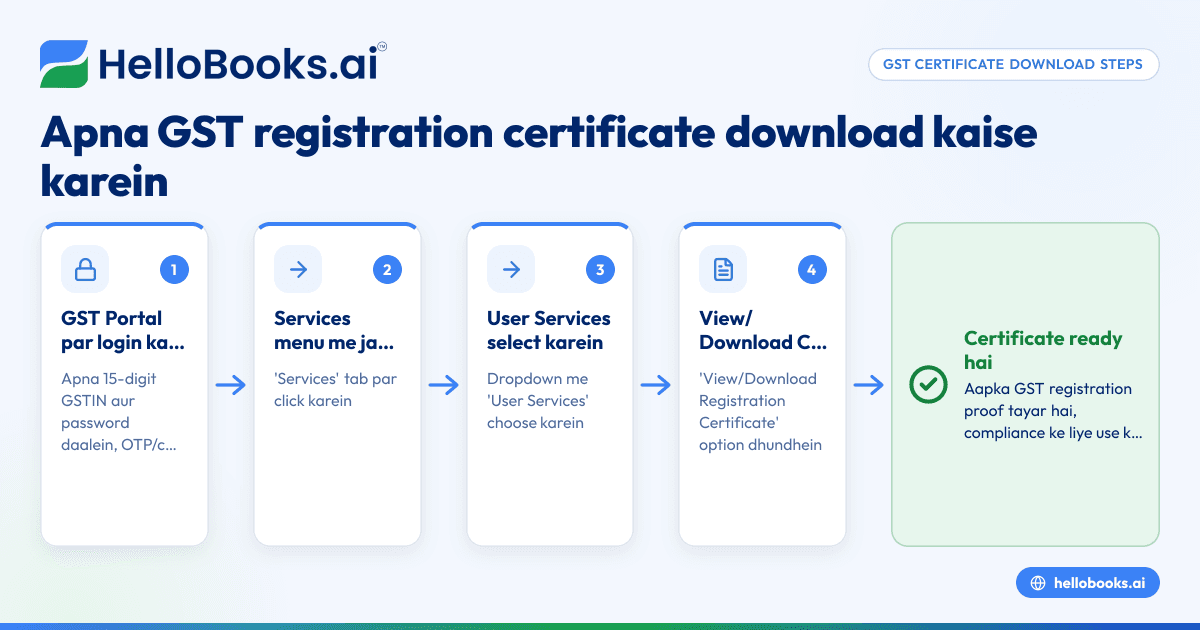
GST registration certificate download karna simple hai agar aapko pata ho kaunse steps follow karne hain. Sabse pehle aapko GST portal par login karna hoga apne GSTIN aur password se. Phir 'Services' menu me jaake 'User Services' ke andar 'View/Download Certificate' option select karna hai. Wahan se aap apna GST registration certificate PDF format me download kar sakte hain.
Why this comes up / what goes wrong
Chhote business owners ke liye GST registration certificate important document hota hai jo GST compliance me proof deta hai ki aap registered hain. Kabhi-kabhi GSTN portal par certificate download karne me confusion ya steps samajhne me dikkat hoti hai, jiski wajah se certificate timely nahi mil pata. Kuch log GSTIN ya password bhool jate hain, ya portal par sahi jagah navigate nahi kar pate. Is article me aapko step-by-step guide milega taaki aap bina kisi dikkat ke apna certificate download kar saken.
Step-by-step
- Visit GST Portal: Browser me gst.gov.in open karein.
- Login: Apna GSTIN (15-digit GST number) aur password daalein. OTP ya captcha verify karne ke baad login complete karein.
- Navigate to Services: Top menu me 'Services' par click karein.
- Go to User Services: Dropdown me 'User Services' option select karein.
- Select View/Download Certificate: Yahan aapko 'View/Download Registration Certificate' ka option milega, uspe click karein.
- Download Certificate: Aapka GST registration certificate screen par khulega. 'Download' button click karke apne device me PDF save kar lein.
- Check Details: Certificate me apka business name, address, GSTIN, registration date, aur other details check kar lein.
Example (kalpanik aankde — fictional figures)
Business Name: Sharma Traders
GSTIN: 29ABCDE1234F1Z5
Registration Date: 15 March 2023
Steps:
- Login with GSTIN: 29ABCDE1234F1Z5
- Navigate to 'Services' > 'User Services' > 'View/Download Certificate'
- Certificate shows registration date: 15 March 2023
- Click 'Download' to save certificate as PDF
Yeh certificate aapke GST registration proof ke liye use hoga.
Common mistakes
- Wrong GSTIN or Password: Login me galat GSTIN/password daalne se login fail ho sakta hai. Ensure sahi details use karein.
- Not Navigating Correctly: 'User Services' ke andar 'View/Download Certificate' dhundhne me dikkat hoti hai. Step 3-5 dhyan se follow karein.
- Ignoring Captcha/OTP: Portal security ke liye captcha ya OTP aata hai, ise miss na karein.
- Not Verifying Certificate Details: Download karne ke baad certificate me business name, GSTIN, aur registration date check karein.
- Using Outdated Browser: GST portal latest browsers me acha work karta hai, outdated browser se problems ho sakti hain.
Doing this in HelloBooks
HelloBooks me aap GST invoicing kar sakte hain jo Rule 46 ke hisaab se compliant tax invoices banata hai, jisme CGST/SGST/IGST split aur HSN/SAC codes customer ke GSTIN se automatically fill hote hain. Isse aapke invoices GST portal ke liye ready rahenge. HelloBooks se aap GSTR-1 aur GSTR-3B direct file kar sakte hain, jisme return aapke recorded invoices se banega, taaki GSTR-1 me figures bilkul match karein. Yeh features aapke GST compliance aur filing process ko asaan banate hain. Details ke liye HelloBooks for India, GST invoicing, aur e-invoicing (IRN and QR) pages dekhein.
Frequently asked questions
GST registration certificate kaise check karein ki valid hai?
Aap GST portal par apna GSTIN dalke certificate download kar sakte hain. Certificate me registration date, business name aur GSTIN match hone chahiye. Kisi bhi doubt me apne CA se confirm karein.
Kya GST registration certificate me koi expiry date hoti hai?
Nahi, GST registration certificate tab tak valid rehta hai jab tak aapka registration cancel ya suspended na ho jaye. Regular compliance zaruri hai.
Kya certificate download karne ke liye koi fee deni padti hai?
GST portal se certificate download karna free hota hai. Aapko sirf apne login credentials chahiye.
Agar GSTIN ya password bhool jaye to kya karein?
GST portal par 'Forgot Username' ya 'Forgot Password' option hota hai jahan aap apna registered mobile number ya email se reset kar sakte hain.
GST registration certificate ka printout chahiye to kya karna hoga?
PDF download karne ke baad aap uska printout apne printer se nikal sakte hain, jo ki legal proof ke liye valid hota hai.
Key takeaways
- GST registration certificate gst.gov.in par login karke 'User Services' me se download karein.
- Apna GSTIN aur password sahi dalein, captcha/OTP verify karna na bhoolen.
- Certificate download karne ke baad details jaise business name, GSTIN, aur registration date check karen.
- HelloBooks se aap GST invoicing aur filing easily manage kar sakte hain.
- Certificate download free hai aur printout legal proof ke liye valid hota hai.
GST registration certificate download karna aapke GST compliance ka basic aur zaruri hissa hai. Agar aap apne business ke GST invoices aur returns ko automate karna chahte hain, to HelloBooks ka use karke apna kaam asaan bana sakte hain. Aap Start on the Free plan (200 transactions a year, GSTR-1 and 3B filing for one GSTIN) par jaakar free plan se shuru kar sakte hain.
Yeh article general jaankari hai, tax ya legal advice nahi. Niyam badalte rehte hain; koi kadam uthane se pehle gst.gov.in par ya apne CA se current position confirm karein.