
Key takeaways
What this article covers, in order:
- First, what's actually changed in GSTR-3B?
- Get these ready before you open the return
- What does each GSTR-3B table mean?
- Filing GSTR-3B on the portal, step by step
- A worked month: Anil's hardware shop in Indore
- Things that go wrong on the 20th
It's the 19th. Your CA isn't picking up, the bank balance is a bit thin, and GSTR-3B is due tomorrow. You can do this yourself, for free. GSTR-3B is a summary return: your sales tax comes in from GSTR-1, you claim input tax credit from GSTR-2B, you pay the gap from your cash ledger, and you file. Here's how, table by table.
First, what's actually changed in GSTR-3B?
If you last filed GSTR-3B a couple of years ago, a few things will feel different.
The big one: since the July 2025 tax period, the outward liability in Table 3 is auto-filled from GSTR-1, IFF and GSTR-1A, and it's locked. You can't type over it. If your sales figure is wrong, you fix it in GSTR-1A for that period before filing GSTR-3B, or through a later GSTR-1. The inter-state breakup in Table 3.2 has been locked too.
Input tax credit in Table 4 is auto-filled from GSTR-2B. As of Sep 2026 it can still be edited, but claiming more than GSTR-2B supports beyond the allowed limit can trigger a DRC-01C notice from the portal. There's been plenty of talk about locking Table 4 as well. Keep an eye on the portal's news section rather than relying on what you read on social media.
The practical upshot? GSTR-3B has become a checking exercise more than a data-entry one. Most of the real work happens earlier, in GSTR-1 and in your Invoice Management System.
Get these ready before you open the return
- Your filed GSTR-1 (or IFF and GSTR-1A) for the period.
- GSTR-2B for the period, ideally already matched against your purchase bills.
- Bills where you pay tax under reverse charge, like legal fees from an advocate or GTA freight.
- Credit you need to reverse, such as on personal use or blocked items.
- A rough idea of your cash ledger balance. Payment is the step where people get stuck.
What does each GSTR-3B table mean?
| Table | What it covers | Where the numbers come from |
|---|---|---|
| 3.1 (a) to (e) | Outward supplies: taxable, zero-rated, nil/exempt, reverse-charge inward, non-GST | Auto-filled from GSTR-1; (d) from GSTR-2B and your own records |
| 3.1.1 | Supplies through e-commerce operators under Section 9(5) | Auto-filled where relevant |
| 3.2 | Inter-state supplies to unregistered persons, composition dealers and UIN holders | Auto-filled from GSTR-1 |
| 4 | Eligible ITC, reversals, net ITC and ineligible ITC | Auto-filled from GSTR-2B; you review and adjust reversals |
| 5 | Exempt, nil-rated and non-GST inward supplies | You fill it |
| 5.1 | Interest and late fee | Calculated by the portal |
| 6 | Payment of tax | Set off from credit ledger, then cash ledger |
You'll recognise the pattern. The portal fills most of it. Your job is to check reverse charge, reversals and payment.
Filing GSTR-3B on the portal, step by step
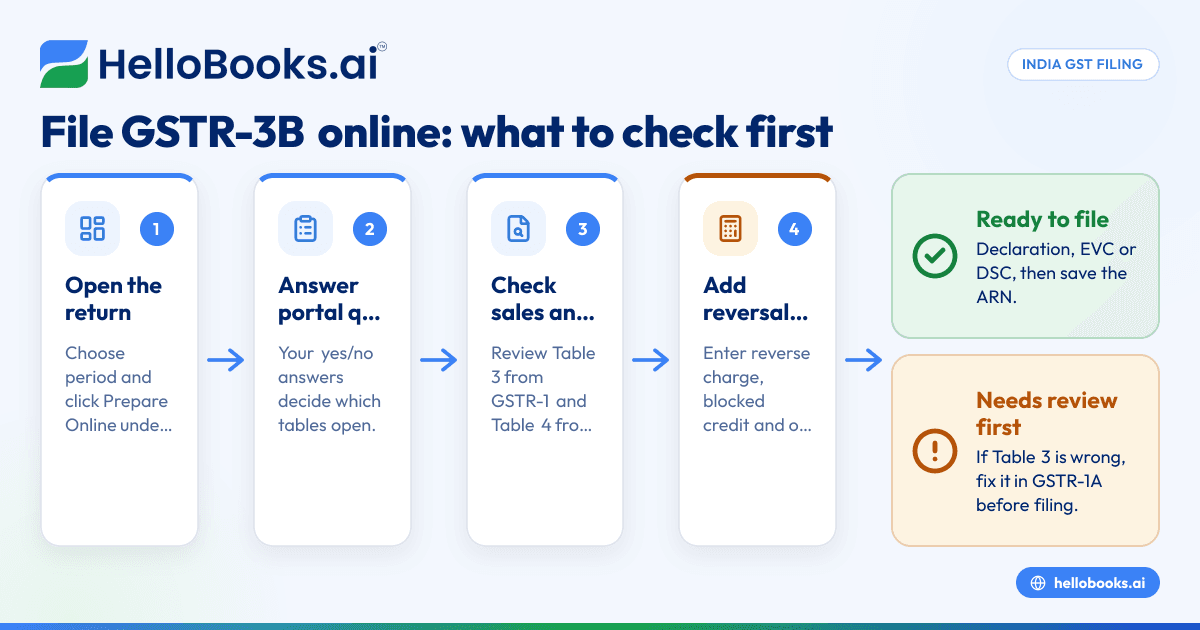
Open the return. Go to Services, then Returns, then Returns Dashboard. Choose the year and period and click Prepare Online under GSTR-3B.
Answer the questions. The portal asks a few yes/no questions about the period, such as whether you had outward supplies, reverse-charge purchases or interest to pay. Your answers decide which tables open up.
Check Table 3.1. Compare it with your GSTR-1. They should match, because one comes from the other. If something looks off, it's a GSTR-1 problem, not a GSTR-3B one.
Add reverse-charge purchases. In 3.1(d), make sure inward supplies where you owe tax under reverse charge are there. GSTR-2B shows the ones your suppliers reported; anything else, like services from an unregistered person that fall under reverse charge, you add from your own records.
Review Table 4. Look at the ITC pulled from GSTR-2B. Then enter reversals you know about: credit on items blocked under Section 17(5), credit on goods used for personal purposes, and anything Rule 42 or 43 requires if you have exempt sales. If a supplier's invoice isn't in GSTR-2B, don't claim it this month.
Fill Table 5 if relevant. Exempt or non-GST purchases, like fuel or purchases from a composition dealer, go here.
Save and check 5.1. If you're filing late, the portal shows interest and late fee. That's the figure you'll pay, so note it.
Make the payment. Click Proceed to Payment. The portal sets off your credit ledger first, in the order the law prescribes (IGST credit is used first). Whatever's left must come from your cash ledger. If the cash ledger is short, create a challan (PMT-06) and pay by net banking, UPI, card, NEFT or RTGS. Once the money shows in the cash ledger, come back and offset.
File. Tick the declaration and file with EVC or DSC. Save the ARN.
A worked month: Anil's hardware shop in Indore
Anil runs a hardware shop in Indore and files monthly. Here's his Sep 2026, simplified and illustrative.
His GSTR-1 shows taxable sales of ₹6,40,000. ₹5,20,000 of that is within Madhya Pradesh at 18% (₹46,800 CGST and ₹46,800 SGST) and ₹1,20,000 is to Gujarat at 18% (₹21,600 IGST). That's ₹1,15,200 in output tax.
His GSTR-2B shows eligible ITC of ₹38,000 CGST, ₹38,000 SGST and ₹15,000 IGST from his suppliers. One purchase of ₹40,000 plus ₹7,200 GST isn't in GSTR-2B yet. He leaves it out.
Out of the credit, ₹1,800 relates to snacks bought for the shop's Diwali party. That's blocked under Section 17(5), so he reverses it (₹900 CGST, ₹900 SGST).
Now the set-off. IGST credit of ₹15,000 is used against his ₹21,600 IGST, leaving ₹6,600. Under the set-off rules, IGST credit has to be used first, and once it's gone, CGST and SGST credit can also be applied against IGST. So he uses ₹6,600 of CGST credit to finish off the IGST.
That leaves ₹30,500 of CGST credit (₹37,100 after the reversal, minus ₹6,600) against ₹46,800 CGST liability. Net cash: ₹16,300 CGST. SGST credit of ₹37,100 against ₹46,800 SGST liability. Net cash: ₹9,700 SGST.
Total cash payable is ₹26,000. He creates a challan, pays by net banking on the 17th, offsets and files by the 18th. No interest, no late fee. Your numbers will differ, and the portal does the set-off arithmetic for you, but it's worth knowing how it gets there.
Things that go wrong on the 20th
The portal slows down badly in the evening of the due date. We've all seen it. Filing a day or two early isn't a luxury.
The cash ledger is short. A challan paid late at night may not reflect immediately. If you pay on the 20th at 10 pm and it shows on the 21st, you're late.
A sales mistake shows up in Table 3. You can't change it in GSTR-3B any more. File GSTR-1A first, if you haven't filed GSTR-3B yet for that period, then come back.
Interest surprises. Interest at 18% a year runs on tax paid late in cash, from the day after the due date. Late fee is per day, with caps. The portal's figure in 5.1 is the one that counts.
If you've got reverse-charge imports of services, ITC reversals under Rule 42/43, or anything involving past periods, a CA's eyes on it are worth the fee.
How HelloBooks helps
HelloBooks builds GSTR-3B from your filed GSTR-1 and your reconciled GSTR-2B, and files it directly to the GST portal from inside HelloBooks. Before you file, you see the interest and late fee as the GST portal's own figure, so there's no guessing.
On the Free plan (₹0, no card, no expiry), GSTR-3B filing is unlimited for one GSTIN, along with GSTR-1 and GSTR-2B reconciliation. Free includes 2 users and up to 200 transactions a year, and your CA can work in the same books. Have a look at the GSTR-3B filing page for the screens, and the GSTR-2B reconciliation page for the credit side.
FAQs
When is GSTR-3B due?
Monthly filers file by the 20th of the next month, so 20 Oct 2026 for Sep 2026. QRMP filers file by the 22nd or 24th after the quarter, depending on their state, so 22 Oct 2026 or 24 Oct 2026 for the Jul–Sep 2026 quarter. CBIC sometimes extends dates; check the portal.
Can I edit the sales figures in GSTR-3B?
Not any more. Table 3 is auto-filled from GSTR-1, IFF and GSTR-1A and locked. Correct mistakes through GSTR-1A before filing GSTR-3B, or in a later GSTR-1.
Can I pay GSTR-3B tax with UPI?
Yes. When you create a challan on the portal, UPI is one of the payment modes along with net banking, cards, NEFT and RTGS. The money goes to your electronic cash ledger and you offset from there.
What if I can't pay the full tax by the 20th?
You can't file GSTR-3B without paying the full liability shown. File as soon as you can pay; interest and late fee keep running until you do.
Can I file GSTR-3B before GSTR-1?
No. Under Section 39(10), the portal won't let you file GSTR-3B for a period until GSTR-1 for that period is filed. It also blocks GSTR-1 if an earlier GSTR-3B is pending. So the order is always last period's GSTR-3B, then this period's GSTR-1, then GSTR-1A if needed, then GSTR-3B.
Pay on the 17th, file on the 18th, and let everyone else fight the portal on the 20th.
Start free — GST filing included, no card. Try HelloBooks Free


