


Key takeaways
What this article covers, in order:
- Why this comes up / what goes wrong
- Step-by-step
- Example (fictional figures)
- Common mistakes
- Doing this in HelloBooks
- Frequently asked questions
Salon owners and accountants often need to export detailed reports to complete bookkeeping and GST compliance efficiently. This is especially true for small and growing salons that maintain records in spreadsheets, Tally, or manual bill books. Exporting accurate reports ensures your accountant can reconcile your books, file GST returns correctly, and prepare financial statements without delays.
Why this comes up / what goes wrong
Salon businesses typically generate many invoices, record expenses, and manage inventory daily. When the business owner or accountant needs to share data for GST filing or audit, they must export comprehensive reports. Problems arise when reports are incomplete, inconsistent, or not aligned with GST returns, causing reconciliation issues or delays in filing.
Accountants handling multiple clients, such as a three-partner CA firm in Ahmedabad managing 80 GST clients, or a solo tax practitioner in Nagpur, require standardised reports that clearly show sales, purchases, expenses, and tax details. Without a clear export procedure, data entry errors and mismatches between books and returns become common.
Step-by-step
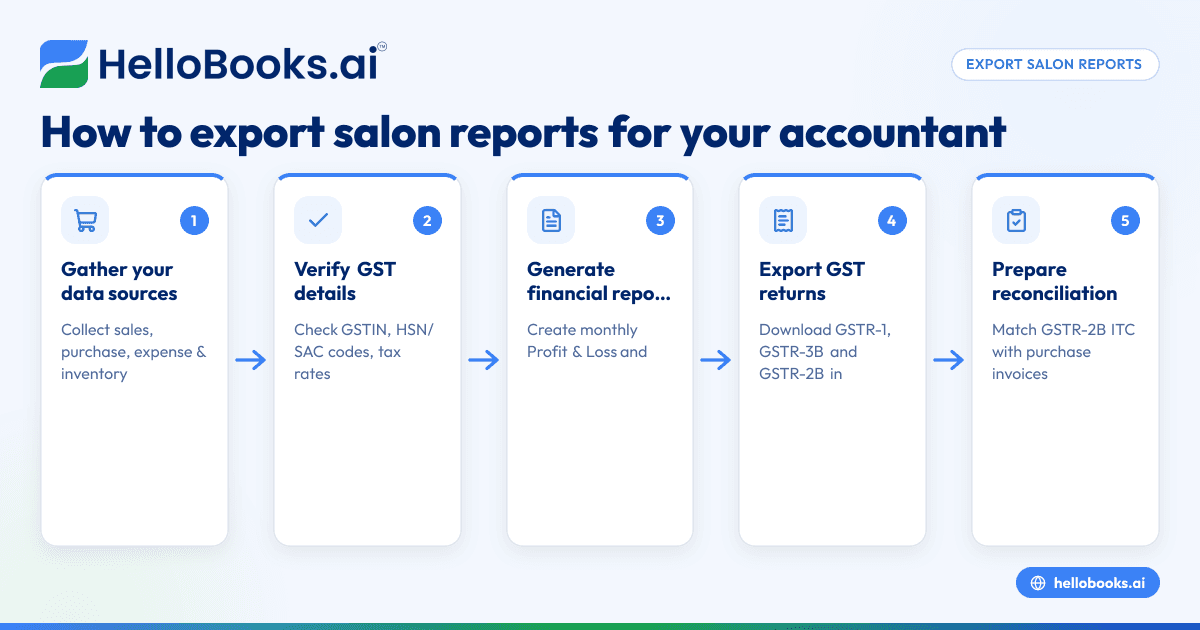
- Gather Your Data Sources: Collect all sales invoices, purchase bills, expense records, and inventory details from your salon’s billing software, Tally, or manual registers. Check that all bills are accounted for and recorded correctly.
- Verify GST Details: Confirm that each invoice has the correct GSTIN, HSN/SAC codes, GST rates, and tax amounts. For exports or SEZ supplies, ensure the invoice carries the endorsement 'SUPPLY MEANT FOR EXPORT/SUPPLY TO SEZ UNIT OR SEZ DEVELOPER FOR AUTHORISED OPERATIONS ON PAYMENT OF INTEGRATED TAX' or the alternative as per Rule 46 [cgst-rule-46/rule46-export-endorsement].
- Generate Financial Reports: Using your accounting system or Excel, create monthly Profit & Loss statements and receivables ageing reports. These reports should reflect the same data used for GST filing to ensure consistency.
- Export GST Returns: Download or prepare your GSTR-1, GSTR-3B, and GSTR-2B reports. These contain outward supplies details, tax liabilities, and ITC claims. Export them in Excel or PDF format.
- Prepare Reconciliation Reports: Match your GSTR-2B (auto-populated ITC) with your purchase invoices to verify eligible input tax credit. Export this reconciliation for your accountant.
- Check Report Formats: Ensure all exported reports are in accessible formats (Excel, CSV, or PDF) and are clearly named with the salon name, report type, and date range.
- Review and Send: Double-check each report for completeness and accuracy. Send the compiled reports to your accountant via email or secure file transfer.
For detailed accounting software features that help with invoicing and reporting, see GST invoicing and Chartered accountants and bookkeeping firms.
Example (fictional figures)
Consider "Glow Salon" in Nagpur for March 2024.
- Total sales (including GST): ₹3,00,000
- GST collected on sales (assumed 18%): ₹3,00,000 × 18/118 = ₹45,763
- Total purchases (including GST): ₹1,50,000
- GST paid on purchases (assumed 18%): ₹1,50,000 × 18/118 = ₹22,881
Profit & Loss Statement for March 2024:
Sales (excluding GST) = ₹3,00,000 - ₹45,763 = ₹2,54,237
Purchases (excluding GST) = ₹1,50,000 - ₹22,881 = ₹1,27,119
Gross Profit = Sales (excl. GST) - Purchases (excl. GST)
= ₹2,54,237 - ₹1,27,119 = ₹1,27,118
GST Payable = GST on sales - GST on purchases
= ₹45,763 - ₹22,881 = ₹22,882
The exported reports would include:
- Sales register showing ₹3,00,000 with GST details
- Purchase register showing ₹1,50,000 with GST details
- P&L statement as above
- GSTR-1 and GSTR-3B returns
- ITC reconciliation matching ₹22,881 input tax credit
Common mistakes
- Incomplete invoice details: Missing GSTIN, HSN/SAC codes, or incorrect tax rates. Prevent by verifying each invoice before exporting.
- Mismatch between books and GST returns: Causes reconciliation issues. Use the same data source for reports and GST filing.
- Exporting reports in incompatible formats: Sending PDF when Excel is needed for reconciliation. Always confirm the accountant’s preferred format.
- Ignoring export invoice endorsements: For exports, missing the mandatory endorsement per Rule 46 leads to compliance issues. Check invoices carefully.
- Late or missing reports: Delays affect GST filing deadlines. Schedule regular monthly exports.
For more guidance on avoiding errors and managing GST compliance, visit HelloBooks for India.
Doing this in HelloBooks
HelloBooks offers financial reports such as monthly P&L and receivables ageing that come directly from the same entries used for GST, ensuring your books and returns agree. You can capture purchase bills using OCR from photos or PDFs, reducing manual entry. If your salon operates in multiple states, HelloBooks supports multi-GSTIN and unlimited users from a single login, simplifying filing across locations. Learn more about these features at HelloBooks for India.
Frequently asked questions
What reports should I export for my accountant from my salon?
Export your monthly Profit & Loss statements, sales and purchase registers, GST returns (GSTR-1, GSTR-3B), and ITC reconciliation reports. These give a full picture of your financial and tax position.
How do I ensure my GST invoices are compliant for exports?
Include the endorsement 'SUPPLY MEANT FOR EXPORT/SUPPLY TO SEZ UNIT OR SEZ DEVELOPER FOR AUTHORISED OPERATIONS ON PAYMENT OF INTEGRATED TAX' or the alternative under bond or LUT. Also, show recipient and delivery addresses and destination country as per Rule 46.
Can I export reports from Excel or Tally for my accountant?
Yes, but ensure the data is complete and consistent. Export reports in Excel or CSV for easy reconciliation. HelloBooks can also help automate this process.
How often should I export reports for my accountant?
Monthly exports are recommended to align with GST filing schedules and keep your books up to date.
What if I have multiple GSTINs for my salon business?
Use software that supports multi-GSTIN filing from one login to simplify report exports and GST compliance. HelloBooks supports this feature.
Key takeaways
- Collect and verify all sales, purchase, and expense data before exporting.
- Generate financial and GST reports that align with your filing requirements.
- Export reports in accountant-friendly formats like Excel or PDF.
- Check export invoice endorsements for compliance with export rules.
- Use tools like HelloBooks for OCR bill capture and multi-GSTIN management.
Exporting your salon reports correctly helps your accountant reconcile books and file GST returns without errors or delays. For a practical demonstration of how to streamline this process, you can Book a 30-minute demo with HelloBooks.


