


Key takeaways
What this article covers, in order:
- Key takeaways
- What is bank reconciliation and why is it important for US small businesses?
- What are the bank reconciliation steps for small businesses?
- How does AI bank reconciliation help small businesses close their books faster?
- Why switch from spreadsheets or traditional software to automated bank reconciliation?
- How to implement automated bank reconciliation software in your US small business?
Automated bank reconciliation software helps small businesses in the United States match their recorded transactions with bank statements quickly and accurately. This technology reduces manual data entry, cuts down errors, and speeds up the month-end close, streamlining financial reporting.
Key takeaways
- Bank reconciliation matches accounting records against bank statements to ensure accuracy and detect discrepancies.
- Automated reconciliation software saves time by importing bank feeds and matching entries automatically.
- Using AI bank reconciliation improves error detection and handles complex transaction patterns efficiently.
- Streamlining month-end close reduces stress, improves cash flow visibility, and makes tax filing easier.
- Integration with accounting software and expense management tools helps maintain consistent, up-to-date books.
- Small businesses benefit from accuracy, faster reporting, and less manual effort with automated bank reconciliation.
What is bank reconciliation and why is it important for US small businesses?
Bank reconciliation is the process of comparing your business’s accounting records against your bank statements. The goal is to identify any differences between what your books show and what your bank account reflects. These differences can stem from timing issues, unrecorded fees, bank errors, or fraudulent activities.
For small businesses in the US, regular bank reconciliation helps ensure that financial statements are accurate and reliable. It supports cash management by highlighting outstanding checks or deposits. Furthermore, it aids in identifying issues early, avoiding costly mistakes during tax season or audits.
What are the bank reconciliation steps for small businesses?
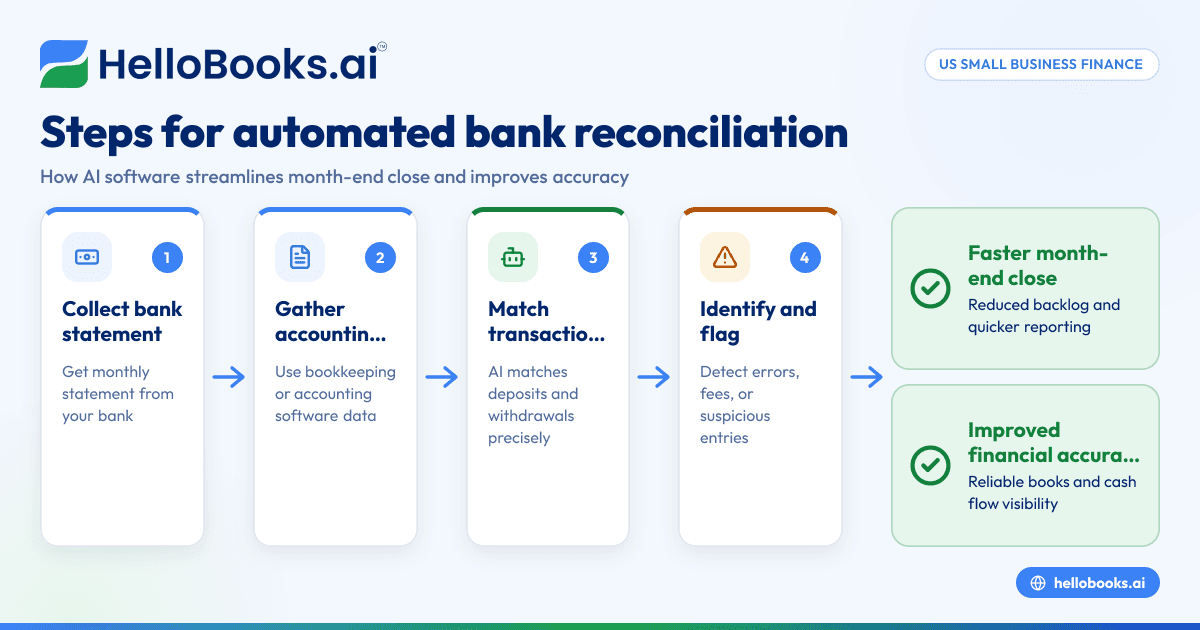
The bank reconciliation steps provide a clear workflow to verify your records:
- Collect bank statement: Obtain your monthly or periodic bank statement from your financial institution.
- Gather accounting records: Use your bookkeeping system, spreadsheets, or accounting software statements.
- Compare deposits and withdrawals: Check each transaction line by line, matching bank entries to your books.
- Identify discrepancies: Highlight any transactions missing from either record, such as bank fees, interest, or timing differences.
- Adjust records: Make appropriate corrections in your accounting system, recording any bank charges, direct debits, or deposits not yet logged.
- Verify adjusted balances: Ensure your adjusted book balance matches your bank statement ending balance.
- Document the reconciliation: Save detailed notes or reports for audit trails and future reference.
Performing these steps manually can consume a significant amount of time and is prone to errors, which leads many US small businesses to using automated bank reconciliation software.
How does AI bank reconciliation help small businesses close their books faster?
AI bank reconciliation automates the matching process by analyzing bank statements and your accounting data using machine learning algorithms. It recognizes patterns, categorizes transactions, and matches entries with high accuracy, reducing manual intervention.
This technology can flag suspicious transactions that may indicate errors or fraud. It also learns over time from user corrections, improving its precision. By automatically reconciling transactions daily, small businesses keep their books up-to-date, preventing a backlog at the month-end close. This results in faster financial reporting and better cash flow management.
Why switch from spreadsheets or traditional software to automated bank reconciliation?
Automated solutions reduce tedious manual work common in spreadsheet reconciliation, which is time-consuming and error-prone. Traditional accounting software may require more manual data entry or lack advanced matching capabilities.
By integrating automated reconciliation into your accounting workflow, you gain:
- Real-time bank feeds syncing transactions automatically.
- Immediate highlighting of discrepancies as they occur.
- Faster month-end closing due to reduced reconciliation backlog.
- Reliable audit trails and documentation.
- Seamless integration with other accounting tools like invoicing, expense management, and financial reporting.
This leads to more accurate books, improved compliance with IRS and state tax authorities, and a clearer picture of your financial health.
How to implement automated bank reconciliation software in your US small business?
Here are the steps to adopt automated reconciliation tools for your business:
- Evaluate your current process: Identify how you currently perform reconciliation, noting pain points or frequent errors.
- Choose the right software: Look for AI-enabled bank reconciliation software that integrates with your existing accounting software like QuickBooks or your ERP system.
- Connect bank feeds: Authorize secure connections to your business bank accounts to allow automatic import of statements.
- Map your chart of accounts: Configure the software to match your specific account categories.
- Run initial reconciliations: Let the software analyze current transactions and suggest matches.
- Review unmatched transactions: Manually verify any exceptions flagged by the system.
- Train your team: Ensure your finance staff understands the new workflow and software features.
- Monitor regularly: Perform ongoing daily or weekly reconciliations to avoid month-end bottlenecks.
By following these steps, your business can transition smoothly and benefit from greater efficiency and accuracy.
What compliance or security considerations matter with bank reconciliation software?
When selecting reconciliation software, US businesses should consider:
- Data encryption and privacy: Your financial data should be securely transmitted and stored to prevent breaches.
- Regulatory compliance: The software should support compliance with IRS regulations, state tax rules, and relevant financial reporting standards.
- Audit trail capability: Ability to generate detailed reports and documentation for tax or audit purposes.
- User access controls: Limit access to sensitive financial information based on roles.
- SOC 2 or similar certifications: While not mandatory for small businesses, certifications show the vendor's commitment to security standards.
Always ensure any automated solution supports your legal and accounting requirements, and remember that this article does not constitute tax or legal advice.
How much does automated bank reconciliation software cost?
The cost varies depending on features, number of bank connections, and integrations with your existing finance stack. Many providers offer tiered pricing plans based on transaction volume or number of users. You can check specific packages and pricing options at pricing.
Investing in automation often saves more in staff time and error reduction than the software costs, providing a quick return on investment for US small businesses.
Can automated bank reconciliation handle multiple bank accounts and currencies?
Yes. Most modern reconciliation tools can manage multiple bank accounts simultaneously, including checking, savings, and credit card accounts. For US-based small businesses, dealing primarily in USD, currency conversion is less common, but software can support foreign currency transactions if needed.
This unified view helps business owners in cities like Chicago, Detroit, or Houston monitor cash flows across accounts effortlessly during the month-end close.
Automated bank reconciliation software significantly simplifies the month-end close process for US small businesses by saving time, reducing errors, and enhancing financial accuracy. If you're ready to transform your bookkeeping and streamline your financial closing, consider exploring AI bookkeeping tools and book a demo today at book a demo or review plans at pricing.
Frequently asked questions
What are common causes of discrepancies during bank reconciliation?
Discrepancies often arise from unrecorded bank fees, outstanding checks not yet cleared, deposits in transit, data entry errors, or timing delays between recording transactions and bank processing.
How often should small businesses perform bank reconciliation?
Ideally, reconcile bank accounts monthly or more frequently—weekly or daily if possible—to maintain accurate books and avoid month-end backlog.
Can bank reconciliation software integrate with QuickBooks?
Yes, many bank reconciliation solutions integrate seamlessly with QuickBooks and other popular accounting software to synchronize data automatically.
Is bank reconciliation software secure for sensitive financial data?
Reputable vendors use encryption, access controls, and secure data centers to protect your financial information; verify that the software meets industry security standards.
What is the difference between bank reconciliation and bank statement reconciliation?
They refer to the same process: comparing internal accounting records with bank statements to verify accuracy and identify discrepancies.
How does automated bank reconciliation improve audit readiness?
By providing detailed reconciliation reports, clear documentation, and ensuring books reflect true bank balances, automated tools make it easier to prepare for audits.
Read next
This article covers one part of a bigger topic. For the complete picture, read our guide to accounting software.


