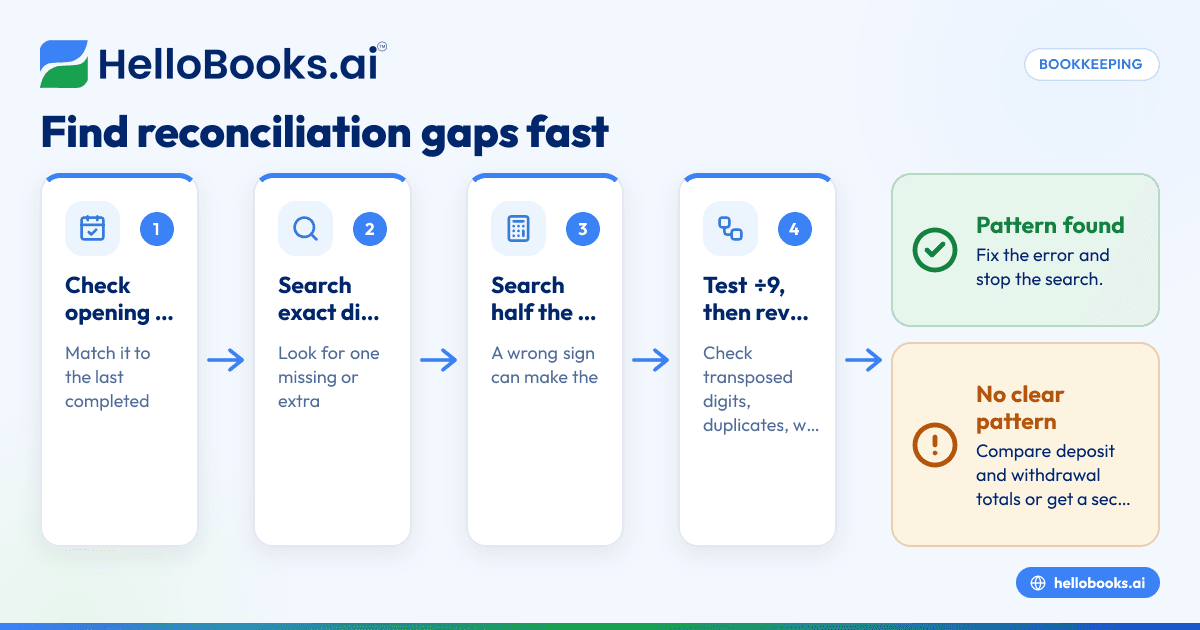

Key takeaways
What this article covers, in order:
- Set a timer. Seriously.
- Minutes 0 to 3: Write down the difference, with its sign
- Minutes 3 to 8: Check the opening balance
- Minutes 8 to 12: Search for the exact amount
- Minutes 12 to 16: Search for half the amount
- Minutes 16 to 20: Divide by 9
To find a reconciliation discrepancy fast, don't start by scanning every line. Check the opening balance first, then search for the exact difference, then for half of it, then test whether it divides by 9, and only then hunt for duplicates and date problems. That order finds most discrepancies in well under half an hour, because each test is quick and rules out a whole category of mistakes.
Set a timer. Seriously.
The worst way to find a reconciliation difference is to stare at 140 transactions hoping one jumps out. It's slow, it's tiring, and after twenty minutes your eyes start skipping lines.
So here's a routine with a clock on it. Each block has a job. If a block finds the problem, you stop. If not, you move on knowing that whole category is ruled out.
Minutes 0 to 3: Write down the difference, with its sign
Write the gap down exactly, and note which side is higher.
Adjusted bank balance: $12,406.55
Adjusted book balance: $12,242.75
Difference: $163.80, books are lower
The sign matters. "Books lower" points to missing deposits, extra withdrawals, or a deposit entered as a withdrawal. "Books higher" points the other way.
Also make sure you've actually finished the basics: deposits in transit and outstanding checks listed, and fees and interest recorded. A surprising number of "discrepancies" are just an unfinished reconciliation.
Minutes 3 to 8: Check the opening balance
Does this statement's beginning balance equal the ending balance of your last completed reconciliation?
If it doesn't, the problem isn't in this month at all. Someone changed, deleted or added a transaction in a period you already reconciled. Common culprits:
- A cleared transaction from last month got edited or deleted.
- A transaction was backdated into a closed month.
- Last month's reconciliation was "forced" with an unexplained adjustment.
If the opening balance is off by the same amount as your current difference, you've found your answer in five minutes. Go back to the prior period, find the change, and fix it there.
Minutes 8 to 12: Search for the exact amount
Search both your books and the statement for the precise figure: $163.80. A single missing or extra transaction of that amount is the simplest possible explanation, and a search box tells you in seconds.
Also check for an amount that, combined with a fee, makes the difference. A $160.00 transfer plus a $3.80 fee looks like nothing until you add them.
Minutes 12 to 16: Search for half the amount
If a deposit was recorded as a withdrawal (or a withdrawal as a deposit), the difference is double the transaction.
$163.80 ÷ 2 = $81.90.
Let's say you're Tom, a plumber in Sacramento. (Tom is made up.) He searches for $81.90 and finds a parts supplier refund, entered as a purchase instead of a credit. The refund should have raised his balance by $81.90; instead his books lowered it by $81.90. Net swing: $163.80. Fixing the sign closes the gap.
This is one of the most common errors there is, especially with refunds, reversals and returned payments.
Minutes 16 to 20: Divide by 9
If the difference divides evenly by 9, look for transposed digits.
Say the difference were $270.00 instead. $270.00 ÷ 9 = $30.00, a whole number. That's a strong hint. Sure enough, a $1,520.00 customer payment was entered as $1,250.00. $1,520.00 − $1,250.00 = $270.00.
Why does this work? Swapping two adjacent digits always creates a difference that's a multiple of 9. It doesn't tell you which transaction, but it tells you what kind of error to look for: amounts that contain the same digits as something on the statement, rearranged.
A related trick: if the difference is a round number like $100.00 or $1,000.00, look for a slide or a single wrong digit, like $1,450.00 entered as $1,350.00.
Minutes 20 to 25: Hunt duplicates and strays
Now look for transactions that exist twice or exist in the wrong place:
- Duplicates. A transaction came in through the bank feed and someone also entered it manually. Or a CSV statement was imported twice for overlapping dates. Sort by amount and look for pairs.
- Wrong account. A payment from savings was recorded against checking.
- Pending vs posted. A card charge was recorded at its pending amount and again when it posted.
- Transfers half-recorded. Money moved from checking to savings, but only one side was entered.
Minutes 25 to 30: Check dates and totals
If you're still stuck, compare totals instead of individual lines:
- Total deposits on the statement vs. total cleared deposits in your books.
- Total withdrawals on the statement vs. total cleared withdrawals in your books.
Whichever pair disagrees tells you where to look. If deposits match and withdrawals are off by $163.80, you can ignore every deposit.
Then check cutoff dates. A transaction dated Oct 1, 2026 in your books but cleared on the Sep 30, 2026 statement (or the reverse) will make a clean reconciliation look broken.
Quick reference: what the difference is telling you
| What you notice | Likely cause | Where to look |
|---|---|---|
| Opening balance changed | Prior period edited | Last month's cleared items |
| Difference equals one amount | Missing or extra transaction | Search the exact figure |
| Half the difference matches a transaction | Wrong sign (deposit as withdrawal) | Refunds, reversals, returns |
| Difference divides evenly by 9 | Transposed digits | Amounts with the same digits |
| Round number ($100, $1,000) | One wrong digit | Large transactions |
| Matches a bank fee or interest | Unrecorded bank item | Fee section of the statement |
| No pattern at all | Several errors combined | Compare deposit and withdrawal totals |
What if 30 minutes isn't enough?
Sometimes there are two or three errors overlapping, and none of the tricks fire. When that happens:
- Go back one week at a time. Reconcile to a mid-month balance if your bank shows a daily balance history.
- Get a second pair of eyes. Your bookkeeper will often spot in five minutes what you've looked past for an hour.
- If the remaining difference is genuinely tiny, say under a dollar, and you've done an honest search, some businesses book it to a clearly labeled discrepancy account with a note. Don't make a habit of it, and never do it for a large amount.
How to stop this from happening next month
- Don't edit reconciled transactions. Make a correcting entry in the current period instead.
- Use one source per account. Either the bank feed or manual entry, not both for the same transactions.
- Never import overlapping CSV date ranges.
- Record refunds as credits against the original expense.
- Reconcile on a schedule. A month of transactions is far easier to search than a year.
How HelloBooks helps
HelloBooks lets you connect most US banks and credit cards, so transactions arrive from the bank's own data, which removes a lot of the typing that causes transpositions and wrong signs. If a bank won't connect, you can import a CSV statement. The reconcile screen helps with a few of the steps above. Each AI match suggestion shows a confidence score and why it picked that match, so a low-confidence pairing (say, two $250.00 charges in one week) is easy to question, and you can unmatch it in one click. Reconciled periods can be locked after sign-off, and reopening one later is logged, which makes the minutes 3 to 8 check much quicker: if an opening balance moved, the log shows whether a closed period was reopened. On Starter ($14.99/month) and above, AI auto-categorization suggests accounts so refunds and fees land in the right place. You can also invite your bookkeeper or CPA into the same books to help track down a stubborn difference. See the bank reconciliation software page and the full bookkeeping features list for details.
FAQs
Why is my bank reconciliation off by a small amount?
Usually an unrecorded fee or interest, a rounding difference on a card processor deposit, or a single mistyped amount. Search for the exact figure first.
What does it mean if the difference is divisible by 9?
It's a strong sign of transposed digits, such as $1,520.00 entered as $1,250.00. Look for amounts that use the same digits in a different order.
Why would the difference be double a transaction?
A deposit was recorded as a withdrawal, or the reverse. Divide the difference by 2 and search for that amount.
My opening balance doesn't match last month. What happened?
A transaction in a previously reconciled period was changed, deleted or added. Find and fix that first; everything after it depends on it.
Should I just adjust the difference away?
Not for anything meaningful. A plug hides real errors. If you must record a tiny unexplained amount after a full search, use a clearly named discrepancy account and leave a note.
Next time the numbers don't agree, start the timer and work the list. It's rarely as bad as it looks.
Start free, no credit card. Try HelloBooks Free