


Key takeaways
What this article covers, in order:
- Why this comes up / what goes wrong
- Step-by-step
- Example (fictional figures)
- Common mistakes
- Doing this in HelloBooks
- Frequently asked questions
Cloud timesheets are essential for accountants and CA firms who want to streamline time tracking, billing, and compliance management. They allow you to log hours digitally, allocate time to clients or projects, and generate accurate invoices without manual errors.
Why this comes up / what goes wrong
Accountants and chartered accountant firms in India often juggle multiple clients with varying billing models, especially when handling GST compliance and bookkeeping. For example, a three-partner CA firm in Ahmedabad managing 80 GST clients must track each client’s billable hours precisely to ensure correct invoicing and GST filing. Similarly, a solo tax practitioner in Nagpur needs an easy way to record time spent on tax returns and GST filings to maintain profitability.
Without cloud timesheets, many accountants rely on manual timesheets, Excel, or paper records, leading to errors, lost hours, and delayed billing. This causes cash flow issues and complicates GST compliance, especially when clients have multiple GSTINs or require detailed reports.
Step-by-step
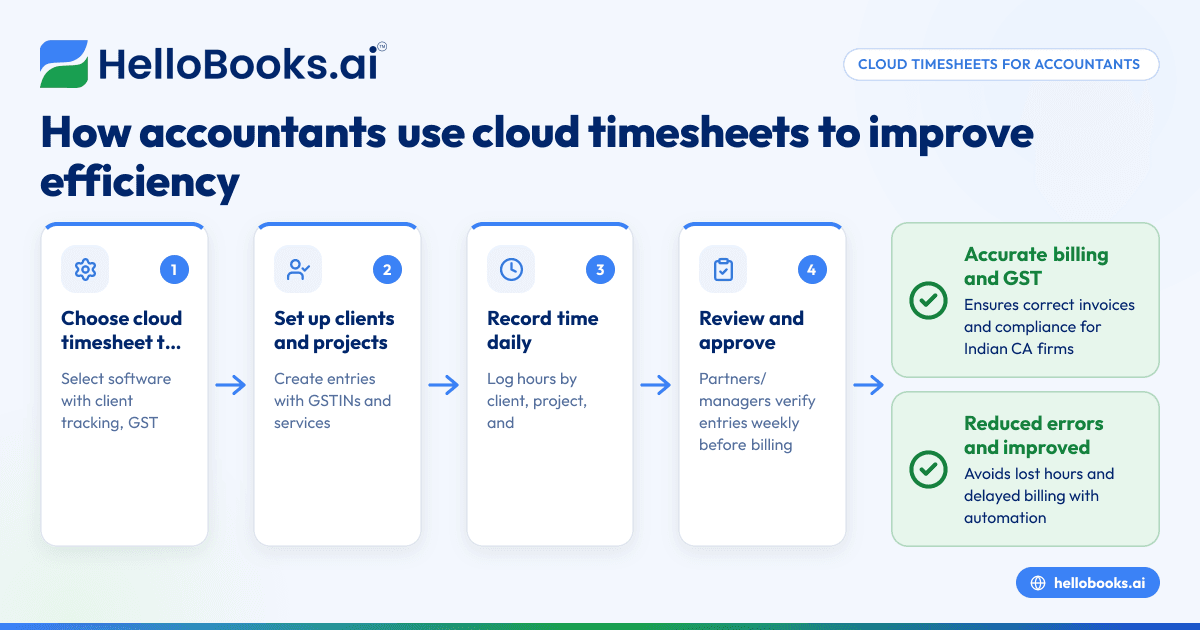
- Choose a cloud timesheet tool suited for accountants: Look for features like client/project tracking, GST compliance support, and multi-user access. Confirm it supports multi-GSTIN management if you handle clients across states.
- Set up your clients and projects: Create entries for each client and assign GSTINs where applicable. For CA firms, set up projects for different services like GST filing, audit, or tax consultancy.
- Record time daily: Encourage your team or yourself to log hours as tasks are done, noting the client, project, and nature of work. This reduces recall errors.
- Review and approve timesheets regularly: Partners or managers should verify entries weekly to ensure accuracy and completeness before billing.
- Generate invoices linked to timesheets: Use the timesheet data to create GST-compliant invoices with correct HSN/SAC codes and GST rates, ready for filing.
- Integrate with accounting and GST filing software: Export timesheet and billing data into your accounting system or GST filing software for reconciliation and compliance.
- Monitor reports for profitability and compliance: Use timesheet reports to analyse client billing, identify unbilled hours, and ensure GST returns reflect actual services rendered.
For more on managing GST invoicing and filing, see GST invoicing.
Example (fictional figures)
Consider a three-partner CA firm in Ahmedabad handling GST compliance for 80 clients. One partner spends 15 hours in April 2024 on GST filing for a client with GSTIN in Gujarat.
- Hourly rate assumed: ₹1,500
- Hours worked: 15
Calculations:
₹1,500 × 15 = ₹22,500 (total billable amount)
Assuming GST on services at 18%:
₹22,500 × 18% = ₹4,050 (GST amount)
Total invoice value:
₹22,500 + ₹4,050 = ₹26,550
The firm logs this in the cloud timesheet, links it to the client’s GSTIN, and generates an invoice with correct GST details for filing.
Common mistakes
- Not updating timesheets daily: Leads to missed hours and inaccurate billing. Prevent by setting daily reminders.
- Ignoring multi-GSTIN complexities: Filing errors occur if timesheets don’t track which GSTIN a client’s service relates to. Use software supporting multi-GSTIN.
- Manual data entry from paper timesheets: Causes transcription errors. Use direct digital entry.
- Lack of approval process: Unverified timesheets can cause disputes. Implement regular reviews.
- Failing to integrate with GST filing: Results in reconciliation issues. Choose tools that export data for GST returns.
For more on managing CA firms efficiently, see Chartered accountants and bookkeeping firms.
Doing this in HelloBooks
HelloBooks supports multi-GSTIN and unlimited users, allowing CA firms and accountants to manage clients across states from a single login. This helps track billable hours linked to each GSTIN and generate compliant GST invoices easily. Learn more about HelloBooks features and plans at HelloBooks for India.
Frequently asked questions
What are cloud timesheets for accountants?
Cloud timesheets are online tools that let accountants track billable hours and tasks digitally. They simplify billing, client management, and GST compliance by automating time recording and invoice generation.
How do cloud timesheets help CA firms with GST compliance?
They enable accurate allocation of hours to clients and GSTINs, ensuring invoices reflect correct GST rates and HSN/SAC codes. This reduces errors in GSTR-1 and GSTR-3B filing.
Can cloud timesheets handle multiple GSTINs for one client?
Yes, especially if the software supports multi-GSTIN management, allowing you to assign billable work to the correct GSTIN for filing.
Are cloud timesheets better than Excel for accountants?
Yes, cloud timesheets reduce manual errors, enable real-time tracking, facilitate multi-user access, and integrate with GST invoicing and filing systems, unlike static Excel sheets.
How can I choose the right cloud timesheet for my accounting firm?
Look for GST compliance features, multi-GSTIN support, ease of use, integration with your accounting software, and multi-user capabilities. Consider your firm size and client complexity.
For more on GST invoicing, visit GST invoicing.
Key takeaways
- Cloud timesheets streamline billable hour tracking and GST-compliant invoicing for accountants.
- Multi-GSTIN support is essential for firms handling clients across Indian states.
- Regular timesheet updates and approvals prevent billing errors.
- Integration with GST filing software improves compliance and reconciliation.
- HelloBooks offers multi-GSTIN and unlimited user access suitable for CA firms.
Cloud timesheets can transform how accountants and CA firms in India manage billing and compliance. To see how HelloBooks can assist your firm, Book a 30-minute demo today and explore the features tailored for multi-GSTIN management and unlimited users.


