
Key takeaways
What this article covers, in order:
- How to use this checklist
- Phase 1: Prepare (5 to 10 minutes)
- Phase 2: Match (15 to 30 minutes)
- Phase 3: Adjust (5 to 15 minutes)
- Phase 4: Close (5 minutes)
- The sign-off log
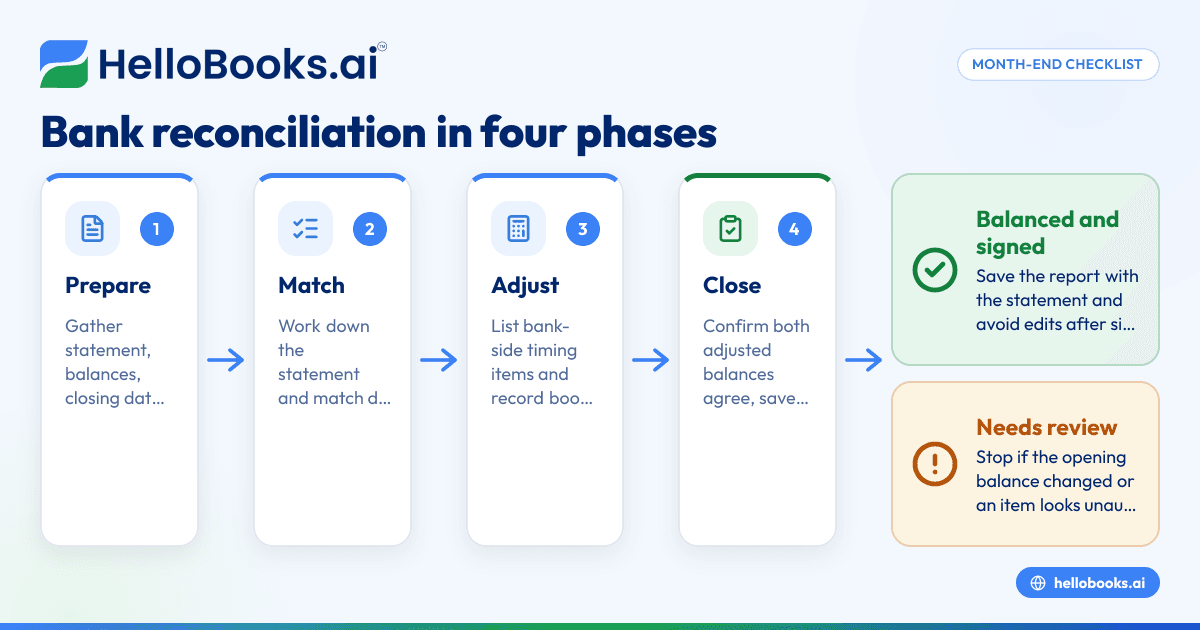
This month-end bank reconciliation checklist takes you from "statement just arrived" to "account signed off" in four short phases: prepare, match, adjust and close. Print it, keep a copy for each bank and card account, and tick it off every month. It's built for small businesses doing their own books, and it works just as well as a review sheet for a bookkeeper.
How to use this checklist
Use one copy per account per month. If you have a checking account, a savings account and two credit cards, that's four copies. It sounds like a lot of paper, but each one takes minutes once the habit sets in, and a stack of signed checklists is exactly what a CPA likes to see at year-end.
Try to start within five business days after each statement closes. For a September 2026 checking statement, aim to be done by about Oct 7, 2026. Cards follow their own closing dates.
Phase 1: Prepare (5 to 10 minutes)
Get everything in one place before you match anything.
- [ ] Download the statement for this account and period.
- [ ] Write down the statement's beginning balance, ending balance and closing date.
- [ ] Confirm the beginning balance equals last month's reconciled ending balance.
- [ ] Make sure every transaction up to the closing date is in your books (bank feed synced or CSV imported).
- [ ] Check that no CSV date ranges overlap with each other or with the bank feed.
- [ ] Pull last month's list of outstanding checks and deposits in transit.
- [ ] Have payment processor payout reports handy for any net card deposits.
Stop sign: if the beginning balance doesn't match last month's ending balance, fix that before going further. Something in a closed period has changed.
Phase 2: Match (15 to 30 minutes)
Work through the statement in order.
Deposits and credits
- [ ] Match each deposit to a recorded payment or sale.
- [ ] Split batched deposits that cover several customer payments.
- [ ] Split net processor deposits into gross sales and fees.
- [ ] Confirm transfers in from other accounts are recorded as transfers, not income.
- [ ] Flag any deposit you can't identify.
Withdrawals and debits
- [ ] Match each check by number and amount.
- [ ] Match debit card purchases and ACH payments by payee and amount.
- [ ] Confirm transfers out and credit card payments are recorded as transfers, not expenses.
- [ ] Flag any withdrawal you don't recognize.
Last month's carry-forwards
- [ ] Tick off last month's outstanding checks that cleared.
- [ ] Tick off last month's deposits in transit that posted.
- [ ] Note any that still haven't cleared.
Phase 3: Adjust (5 to 15 minutes)
Now handle the differences.
Bank-side items (list only, no entries)
- [ ] List deposits in transit with dates and amounts.
- [ ] List outstanding checks with numbers, dates and amounts.
Book-side items (record an entry for each)
- [ ] Bank service charges and wire fees.
- [ ] Interest earned.
- [ ] Returned customer checks (move the amount back to accounts receivable).
- [ ] Returned-item and overdraft fees.
- [ ] Automatic payments or deposits never entered.
- [ ] Corrections for mistyped amounts or wrong signs.
Investigate
- [ ] Any transaction you don't recognize (contact the bank promptly if it might be unauthorized).
- [ ] Any outstanding check older than 90 days.
- [ ] Any deposit in transit older than a few business days.
Phase 4: Close (5 minutes)
- [ ] Adjusted bank balance = statement balance + deposits in transit − outstanding checks.
- [ ] Adjusted book balance = book balance after all adjustments above.
- [ ] Both adjusted balances agree to the cent.
- [ ] Save the reconciliation report with the statement attached.
- [ ] Write a one-line note for anything carried forward or unresolved.
- [ ] Sign and date the checklist.
- [ ] Don't edit any transaction in this period after sign-off; use a correcting entry in a later period instead.
The sign-off log
Keep this table at the front of your folder (or in a shared spreadsheet). It's the quickest way to see which accounts are current.
| Account | Period | Statement closing date | Reconciled by | Date done | Notes |
|---|---|---|---|---|---|
| Operating checking | Sep 2026 | Sep 30, 2026 | |||
| Reserve savings | Sep 2026 | Sep 30, 2026 | |||
| Business card (main) | Sep 2026 statement | Sep 25, 2026 | |||
| Business card (team) | Sep 2026 statement | Sep 18, 2026 |
A worked mini-example
Carla runs a small bakery in Portland, Oregon. (She's a made-up example.) Here's what Phase 3 and Phase 4 looked like for her September 2026 checking account:
| Line | Amount |
|---|---|
| Statement ending balance, Sep 30, 2026 | $7,214.80 |
| + Deposit in transit (Saturday sales, deposited Sep 30, 2026) | +$860.25 |
| − Outstanding check #508 (flour supplier) | −$412.60 |
| Adjusted bank balance | $7,662.45 |
| Book balance before adjustments | $7,681.45 |
| + Interest earned | +$1.00 |
| − Monthly service fee | −$20.00 |
| Adjusted book balance | $7,662.45 |
Check the math: $7,214.80 + $860.25 = $8,075.05, minus $412.60 = $7,662.45. On the book side, $7,681.45 + $1.00 = $7,682.45, minus $20.00 = $7,662.45. Balanced. She ticks the last box and signs.
Who should sign off?
In a one-person business, you do. That's fine. Once there's a team, it helps to separate duties where you can: the person who writes checks or spends on cards shouldn't be the only person who reconciles those accounts. Even a monthly review by the owner, initialing the sign-off log, adds a real layer of protection. If you work with an outside bookkeeper, they can do the reconciliation while you review and initial.
Extras for the end of the year
At the last month of your fiscal year, add these:
- [ ] Every account reconciled for all twelve months.
- [ ] Outstanding checks older than six months resolved (voided, reissued or moved to a liability).
- [ ] Any balances parked in a holding or "ask my accountant" account cleared out.
- [ ] Loan balances tied to lender statements.
- [ ] Reports exported and ready for your CPA.
Clean books make tax time easier; your CPA handles the filing.
How HelloBooks helps
HelloBooks lets you connect most US banks and credit cards, so Phase 1's "get everything into the books" step is mostly done for you; a CSV statement import covers any bank that won't connect. For Phase 2, the reconcile screen lines the statement up against your ledger and suggests a match on each line, with a confidence score and the reason, so you tick off the exceptions rather than every line; a wrong match can be undone in one click. For Phase 4, it produces the reconciliation report (opening balance, cleared items, outstanding items, closing balance) in PDF or CSV to file with the statement, and after sign-off you can lock the period, and reopening one later is logged. That covers the "don't edit after sign-off" box. Credit-card accounts reconcile the same way. Free includes 1 live bank feed, up to 200 transactions per year, and P&L, Balance Sheet and Cash Flow reports. Starter ($14.99/month) adds AI auto-categorization and 3 bank connections, and Pro ($39.99/month) gives you unlimited bank connections and AI Analysis on every report. AP/AR aging is on every plan, which helps with the "returned customer check" and "old outstanding check" items above. You can invite your bookkeeper or CPA into the same books to handle the sign-off. See the bank reconciliation software page, and if you're tightening up the rest of month-end, cash flow management and invoicing are good next stops.
FAQs
What documents do I need for a bank reconciliation?
The bank or card statement for the period, your books up to the closing date, last month's reconciliation report, and any processor payout reports for net card deposits.
How long should a month-end reconciliation take?
For a small business with a connected bank feed and up to about 150 transactions, 30 to 60 minutes per account is typical. The first one takes longer.
Should I keep paper copies of reconciliations?
Paper or digital, either works. What matters is that each reconciliation is saved with its statement and is easy to find later.
Who should do the reconciliation in a small team?
Ideally someone other than the person who spends from the account, or at least have the owner review and initial it.
What if one item on the checklist can't be resolved this month?
Note it, carry it forward, and make it the first thing you check next month. Don't hold up the whole reconciliation for one open question.
Print a stack, clip one to each statement, and month-end gets a lot quieter.
Start free, no credit card. Try HelloBooks Free