


Key takeaways
What this article covers, in order:
- Why this comes up / what goes wrong
- Step-by-step
- Example (fictional figures)
- Common mistakes
- Doing this in HelloBooks
- Frequently asked questions
An accountant AI practice CRM is software designed to combine client management with AI-powered bookkeeping and bank reconciliation, tailored for accounting firms and solo practitioners in India. It streamlines GST compliance, invoicing, and data handling. This article covers why accountants seek such tools, step-by-step guidance to choose and use them, a worked example for Indian CA firms, common mistakes, and how HelloBooks supports these needs.
Why this comes up / what goes wrong
Chartered accountants and tax practitioners in India often manage multiple GST clients, bank reconciliations, invoice tracking, and compliance deadlines. Many still rely on spreadsheets, bill books, or Tally, which involve repetitive data entry and leave room for errors. Handling client data, tracking GST across multiple GSTINs, and reconciling bank statements manually can cause delays and inefficiencies. An AI-enabled practice CRM built for accountants can automate data entry, improve accuracy, and centralise client workflows.
For example, a three-partner CA firm in Ahmedabad managing 80 GST clients faces complex multi-GSTIN filing and client coordination. Likewise, a solo tax practitioner in Nagpur must efficiently manage GST returns, invoicing, and bank reconciliations without a large support team. These challenges prompt the search for an accountant AI practice CRM.
Step-by-step
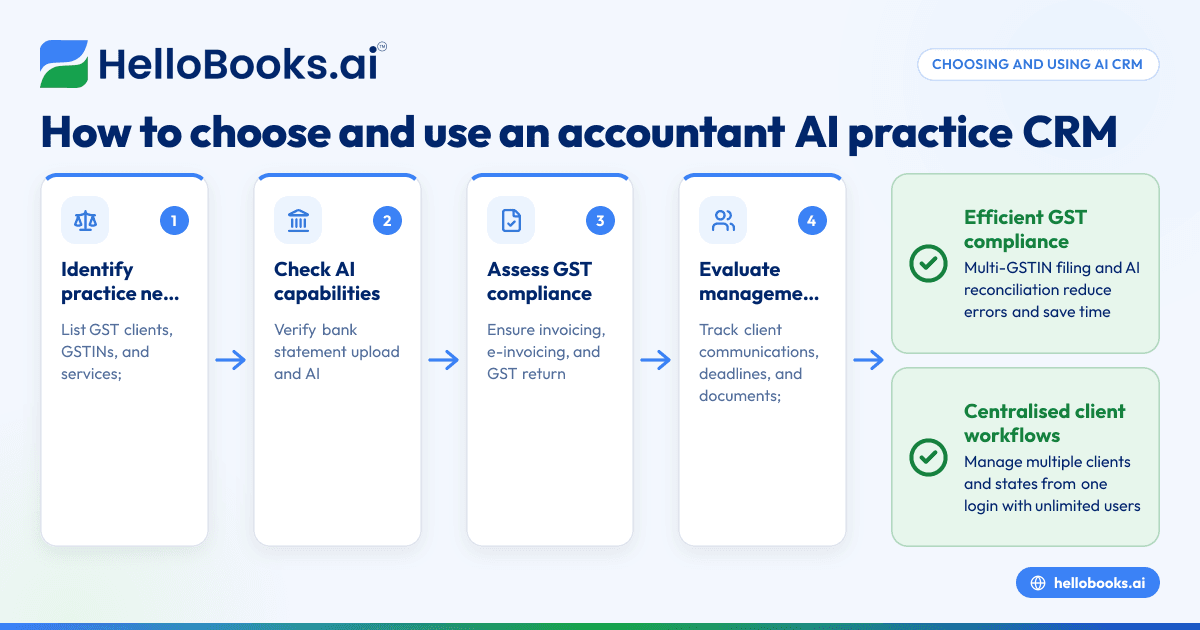
- Identify your practice needs and client load
- List the number of GST clients, GSTINs, and services you provide (GST filing, bookkeeping, invoicing).
- Check if you require multi-GSTIN support or multiple user access.
- Check AI capabilities for bookkeeping and reconciliation
- Verify if the CRM supports bank statement upload and AI reconciliation for Indian banks.
- Confirm it can auto-match transactions to invoices and ledger entries to reduce manual data entry.
- Assess GST compliance features
- Ensure the software supports GST invoicing, e-invoicing, and return filing (GSTR-1, GSTR-3B).
- Look for GSTR-2B reconciliation to verify ITC claims.
- Evaluate client and practice management tools
- Check if the CRM helps track client communications, deadlines, and document management.
- Consider integration with accounting workflows and reports.
- Review user access and pricing
- Confirm support for unlimited users if you have a team.
- Understand pricing plans and if multi-GSTIN filing is included.
- Test ease of use and support
- Use trial versions or demos to check the interface.
- Evaluate customer support responsiveness.
- Plan data migration and training
- Prepare to migrate existing client data and financial records.
- Schedule training for your team to maximise adoption.
For more on accounting firm software, see Chartered accountants and bookkeeping firms.
Example (fictional figures)
A three-partner CA firm in Ahmedabad manages 80 GST clients across Gujarat and Maharashtra, each with separate GSTINs. The firm files GSTR-1 and GSTR-3B monthly for both states and reconciles bank statements.
In March 2024, the firm uploads a bank statement for one client with receipts of ₹1,20,000 and payments of ₹50,000.
- Total receipts = ₹1,20,000
- GST assumed rate = 18% (illustrative)
- GST on receipts = ₹1,20,000 × 18% = ₹21,600
- Total payments = ₹50,000
The AI reconciliation matches many transactions automatically, reducing manual work and highlighting exceptions for review. The firm files returns for both GSTINs from one login using multi-GSTIN support, saving time and reducing errors.
Common mistakes
- Ignoring multi-GSTIN needs
- Prevent by confirming the CRM supports all your GSTINs under one login.
- Not verifying AI reconciliation capabilities
- Prevent by testing bank statement upload and match confidence levels.
- Neglecting user access controls
- Prevent by ensuring unlimited users or appropriate roles are supported.
- Skipping GST compliance feature checks
- Prevent by verifying invoicing, e-invoicing, and GST return filing features.
- Failing to plan data migration
- Prevent by preparing existing data and consulting support.
- Choosing software without practice management features
- Prevent by evaluating client tracking and document management tools.
See more about GST invoicing at GST invoicing.
Doing this in HelloBooks
HelloBooks enables bank statement upload and AI reconciliation in India, allowing accountants to upload PDF, CSV, or Excel bank statements and automatically match transactions to invoices and ledger entries without retyping. It supports multi-GSTIN filing and unlimited users from one login, helping CA firms and tax practitioners manage multiple clients and states efficiently. Learn more at HelloBooks for India.
Frequently asked questions
What is an accountant AI practice CRM?
An accountant AI practice CRM is software that combines client management, GST compliance, and AI-powered bookkeeping tools to help accounting firms and practitioners automate data entry, bank reconciliation, and GST filing.
How does AI reconciliation help accountants?
AI reconciliation matches bank statement transactions to invoices and ledger entries automatically, reducing manual data entry and errors, and saving time during GST compliance and bookkeeping.
Can I manage multiple GSTINs with one software login?
Yes, some practice CRMs support multi-GSTIN filing and allow unlimited users to access the system from a single login, simplifying compliance for firms with clients in multiple states.
Is e-invoicing included in accountant AI practice CRMs?
Many practice CRMs include GST invoicing features, including e-invoicing, which helps generate IRNs and QR codes as per government rules, streamlining client invoicing.
How do I choose the right AI practice CRM for my CA firm?
Evaluate your client load, GSTINs, AI reconciliation accuracy, GST compliance features, user access, and ease of use. Testing demos and checking support services are also important steps.
Key takeaways
- Accountant AI practice CRMs combine client management with AI bookkeeping and GST compliance.
- Multi-GSTIN and unlimited user support are essential for CA firms with many clients.
- AI bank reconciliation reduces manual data entry and errors.
- Check GST invoicing, e-invoicing, and return filing features before choosing.
- Plan data migration and user training for smooth adoption.
- HelloBooks supports AI reconciliation and multi-GSTIN filing for Indian accountants.
To see how HelloBooks can help your practice, Book a 30-minute demo.


