HelloBooks.ai home

Invoice Management Software — Track & Get Paid | HelloBooks Invoice management software with recurring billing, automatic payment matching, dunning reminders, and Stripe or Razorpay payment links. Free Plan, no card.

Invoice management software, online invoicing software, AR automation, recurring invoices, e-invoicing, GST invoicing, VAT invoicing, and payment links — HelloBooks ships all of the above on a single live ledger.

Stripe, Razorpay, ACH, UPI, and country-specific payment rails are live in production; multi-currency, FX-aware AR tracking and tax-compliant templates ship in every market.

Invoice Management

Invoice management software that does the chasing for you

Send a professional invoice with one click, take payment by Stripe / Razorpay / ACH on the same page, and let HelloBooks chase what is overdue with email and WhatsApp reminders on a cadence you control. The AI matches incoming payments back to invoices so the AR ledger stays accurate.

Free Plan with invoices within 200 transactions/year, bills & quotes — no credit card.

From quote to cash, on one timeline

Invoice management is not just sending PDFs. It is converting an accepted quote into an invoice, taking the payment, matching the deposit in the bank feed, recognising the revenue, and following up on what is overdue. HelloBooks ties all of those steps to one customer timeline so you always know what is outstanding, what is paid, and what is at risk.

  • Quote → invoice conversion with one click; line items and pricing carry over
  • Branded invoice templates with your logo, colors, and payment terms
  • Embedded payment links (Stripe, Razorpay, ACH, UPI) on the invoice itself
  • Recurring invoices for subscription and retainer billing
  • Multi-currency invoicing with FX-aware AR tracking
  • Automatic payment matching from the bank feed back to the invoice
  • Dunning sequences (email + WhatsApp) on a cadence you control

HelloBooks.aiSmarter accounting for growing businesses

Bill. Get paid. Reconcile.

Quote to Cash on One TimelineEvery invoice, from accepted quote to reconciled deposit.
  1. Step 1

    Quote accepted

    Converts to an invoice in one click

  2. Step 2

    Invoice sent

    Branded, tax-compliant, with terms

  3. Step 3

    Pay link

    Stripe, Razorpay, ACH or UPI on the invoice

  4. Step 4

    Follow-up

    Email + WhatsApp dunning on your cadence

  5. Step 5

    Deposit matched

    Bank feed payment matched to the invoice

  6. Step 6

    Revenue booked

    AR ageing updates in real time

No re-keying between quote, invoice and bank.
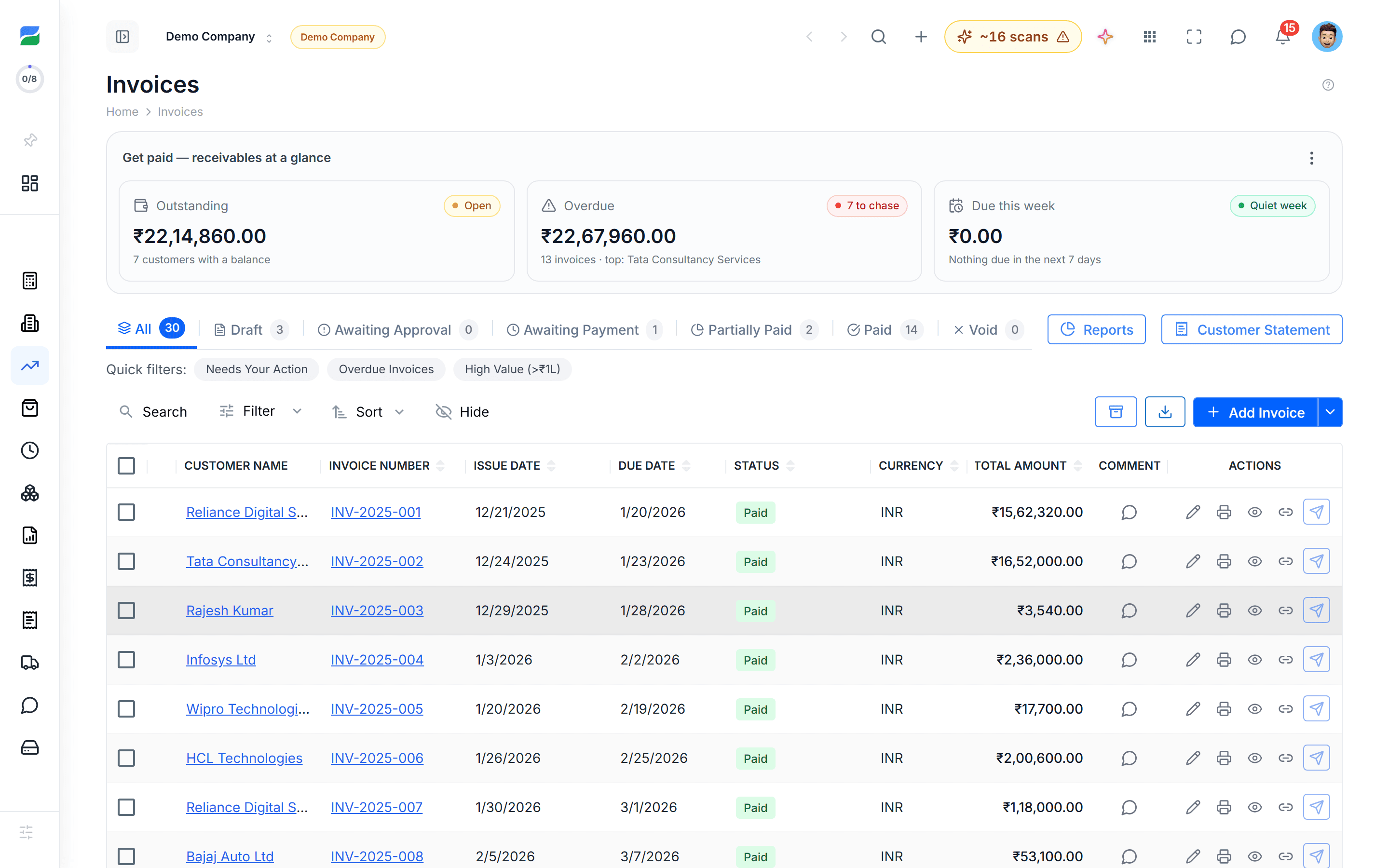
HelloBooks invoices list with a receivables-at-a-glance summary showing outstanding, overdue and due-this-week totals plus per-invoice status
The invoices workspace: receivables at a glance up top, every invoice and its status below — what is outstanding, paid, and at risk on one screen.

AI handles the AR follow-up so you do not have to

Most overdue invoices get paid because someone followed up — politely, then firmly, then again. HelloBooks runs that sequence for you: a friendly nudge at +3 days, a firmer reminder at +10, an escalation copy to the customer’s AP contact at +20, and a hold-on-future-orders flag at +30. You set the cadence and tone; the AI runs it.

When the customer pays, the bank feed picks it up, the AI matches the payment to the invoice, and the dunning sequence stops automatically.

HelloBooks.aiSmarter accounting for growing businesses

Chase less. Collect more.

Automated Dunning, Day by DayPolite, then firm, then escalated — and it stops the moment you are paid.
  1. Due

    Invoice due

    Payment link already on the invoice

  2. +3

    Friendly reminder

    Email with the payment link embedded

  3. +10

    Firmer reminder

    Copies the customer's AP contact

  4. +20

    Escalation

    Email + WhatsApp (where supported)

  5. +30

    Hold flag

    Future orders held; CFO-to-CFO template

  6. Paid

    Dunning stops

    Deposit matched to the invoice automatically

Days are counted after the due date. You set the cadence and tone; HelloBooks runs it.

Payment matched in the bank feed = reminders stop.

Tax-compliant invoicing, country by country

Tax compliance on invoices is non-negotiable. HelloBooks ships country-specific invoice templates and tax handling for the U.S. (sales tax), U.K. (VAT), India (GST + e-invoicing via IRN), Australia (GST tax invoice), Canada (GST/HST), Singapore (GST), New Zealand (GST), and the UAE (VAT). The right tax codes apply automatically based on customer and item.

For India, e-invoicing (IRN generation) and e-way bills are first-class — no third-party integration needed.

Built for both product and service businesses

For service businesses: time-tracked hours flow into invoices, retainers draw down automatically, and project-based invoicing keeps each engagement reconciled.

For product businesses: inventory items deduct on invoice, COGS posts to the right account, and partial shipments are billed and tracked separately.

How teams use HelloBooks

What HelloBooks does for businesses like yours

“AI categorizes every transaction automatically and learns from your corrections, so a small team keeps clean books without spending evenings on manual data entry.”
Small business · US
“For a practice managing dozens of client books, automated reconciliation turns a full day of matching into a background task — review the AI matches, approve, and move on.”
Accounting practice · US
“Snap a receipt on your phone and the AI reads, categorizes, and files it — bookkeeping stays current even for people who would rather not think about numbers.”
Freelancer · mobile-first

Illustrative scenarios describing what the product does for each business type — not attributed customer reviews.

FAQ

Frequently asked questions

How do customers pay?
Payment links are embedded on the invoice itself. Customers can pay by card (Stripe), ACH (U.S.), Faster Payments (U.K.), Razorpay (India: UPI, cards, netbanking), and the equivalent local rails in AU, CA, SG, NZ, AE. Both Stripe and Razorpay are live in production.
Can I run recurring invoices?
Yes. Set the cadence (weekly, monthly, quarterly, annual) and HelloBooks generates and sends the invoice on schedule, optionally taking payment automatically via a saved card or auto-debit mandate.
What happens when an invoice is overdue?
A dunning sequence runs on the cadence you configure — typically email reminders at +3, +10, +20, +30 days, with WhatsApp escalation available in India. The AI stops the sequence the moment payment is matched in the bank feed.
Does it handle e-invoicing for India?
Yes. HelloBooks generates the IRN, embeds the QR code on the invoice PDF, and posts the invoice to the GST portal. E-way bills are generated from the same screen.
Can I send invoices in multiple currencies?
Yes. Multi-currency is native — invoice in any currency, with FX rates pulled daily. The AR ledger tracks the original currency, the functional currency, and the realised/unrealised FX gain or loss.

See it in action

Hellobooks Sales Credit Notes | Manage Customer Credits & Invoice Adjustments

Handle customer credits, invoice adjustments, and sales corrections easily with Hellobooks Sales Credit Notes.

Hellobooks Copy To Invoice | Convert Documents into Invoices Easily

Create invoices faster and reduce duplicate data entry with Hellobooks Copy To Invoice.

How to Apply Invoice Discounts in HelloBooks | Customer Discount Setup Demo

Offering invoice discounts is a powerful way to improve customer relationships and accelerate payments.

How to Upload Invoices in HelloBooks | Step-by-Step Demo

Manual invoice entry can be slow and error-prone.

Start automating your books today

Free Plan with full access to the AI accountant — no credit card, no time limit.

Subscribe to our newsletter

Stay up to date with the latest news and announcements. No credit card required.

By subscribing, you agree to our Privacy Policy.
