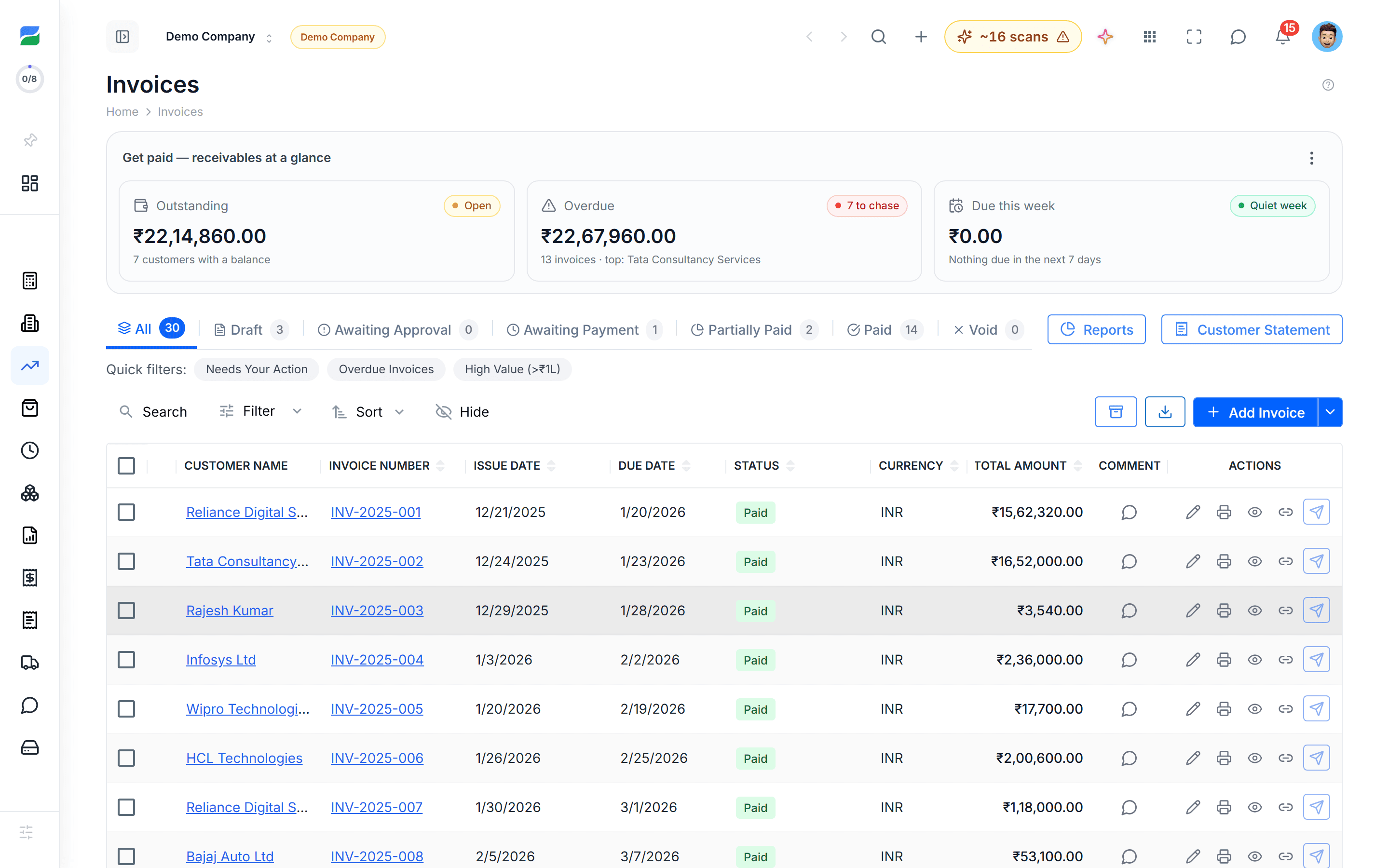
Accounts Receivable Automation — Auto-Match Payments & Cut DSO | HelloBooks.ai AR automation that auto-matches incoming payments, chases overdue invoices, and reduces DSO with email + WhatsApp dunning. Stripe, ACH, UPI live. Free Plan, no credit card.

Accounts receivable automation, AR automation software, invoice dunning, payment matching, DSO reduction, and AR aging — HelloBooks ships all of the above on a single live ledger.

Stripe, Razorpay, ACH, UPI, and country-specific deposit matching are live; partial-payment, batched-deposit, and FX-adjusted matching all handled by AI.

AR Automation

Accounts receivable automation that gets you paid sooner

HelloBooks chases your overdue invoices on a cadence you control, takes payment by Stripe / Razorpay / ACH / UPI on the invoice itself, and auto-matches the cash back to the right invoice the moment it hits the bank. DSO drops because the dunning never lapses.

Free Plan with 500 AI credits/month — no credit card.

Why DSO creeps up — and how to fix it

Days Sales Outstanding (DSO) grows quietly. An invoice sits because nobody followed up. A payment arrives but is not matched, so the dunning email goes out anyway and the customer gets annoyed. A partial payment is recorded against the wrong invoice and the AR aging report drifts from reality.

HelloBooks fixes each of those failure modes. Automated dunning never lapses. AI matching of incoming payments to invoices runs the moment the bank feed updates. Partial payments are tracked at the invoice level, not the customer level, so AR aging reflects what is actually outstanding.


How automated dunning works

You configure the cadence and tone; HelloBooks runs it. The dunning sequence stops the moment payment is matched in the bank feed.

  • +3 days overdue: friendly reminder by email, with the payment link embedded
  • +10 days: firmer reminder, copying the customer’s AP contact if known
  • +20 days: escalation email + WhatsApp (where supported) to the customer’s billing contact
  • +30 days: hold flag on future orders, optional CFO-to-CFO email template
  • Customer pays: bank feed picks up the deposit, AI matches it to the invoice, dunning stops

AI payment matching — including the messy cases

Most AR tools match a payment to an invoice when the amount and reference match exactly. That works maybe 60% of the time. HelloBooks handles the other 40% — partial payments, batched deposits from a payment processor, FX-adjusted amounts, payments with no invoice reference, and payments that span multiple invoices for the same customer.

Where the AI is not confident, it surfaces the candidates with a confidence score and an explanation. One click to confirm; the AI uses the confirmation to improve the next match.

AR aging and cash forecasting in real time

AR aging updates every time a payment posts. The AI predicts expected payment dates per customer based on historical behaviour, so cash forecasting is grounded in real payment patterns instead of due dates that customers ignore.

Slow-paying customers are flagged automatically. You can set credit limits per customer that block new invoicing until the AR balance drops below the threshold.

FAQ

Frequently asked questions

How does HelloBooks chase customers?
Configurable email dunning at +3, +10, +20, +30 days (and any custom cadence you set), with optional WhatsApp escalation in markets where it is supported. The sequence stops automatically when payment is matched in the bank feed.
How does payment matching work?
When a deposit hits the bank feed, the AI scores possible invoice matches (exact, partial, batched, FX-adjusted) and auto-matches high-confidence cases. Lower-confidence matches surface with the candidates and an explanation; one click confirms.
What payment rails are live?
Stripe and Razorpay are live in production for card / UPI / netbanking. ACH (U.S.), Faster Payments (U.K.), UPI/NEFT (India), BPAY (AU), Interac (CA), FAST (SG) are matched in the bank feed automatically.
Can I set credit limits per customer?
Yes. Credit limits block new invoicing for a customer once their AR balance exceeds the threshold; an override requires admin approval and is logged in the audit trail.
Does it work for multi-currency AR?
Yes. AR is tracked in original currency, functional currency, and reporting currency, with realised and unrealised FX gain/loss posted automatically on settlement.

Start automating your books today

Free Plan with full access to the AI accountant — no credit card, no time limit.

Subscribe to our newsletter

Stay up to date with the latest news and announcements. No credit card required.

By subscribing, you agree to our Privacy Policy.

    Accounts Receivable Automation — Auto-Match Payments & Cut DSO | HelloBooks.ai