
Key takeaways
What this article covers, in order:
- Key takeaways
- Why sales tax tracking matters for US businesses
- What should you set up first?
- How do you track sales tax correctly in your books?
- Can ai sales tax tools help with setup?
- Recommended sales tax tracking workflow
Sales tax tracking in accounting software in the United States means setting up your system so every taxable sale, exemption, rate, and filing liability is captured correctly as you invoice and collect payments. Done well, it reduces manual errors, speeds up month-end close, and gives you a clear view of what you owe by state or local jurisdiction.
Key takeaways
- Sales tax tracking starts with clean setup, not just turning on a tax feature.
- You need the right tax codes, nexus list, product taxability, and customer exemption handling.
- Your accounting software should separate sales, sales tax collected, and payments in the general ledger.
- Regular reviews matter because rates, product taxability, and filing obligations can change.
- Bank feeds and reconciliation help confirm that taxable sales and cash collections match.
- Good accounting software in the USA should make tax tracking easier, but you still need a clear process.
Why sales tax tracking matters for US businesses
Sales tax is not just another expense line. In most cases, it is money you collect from customers and hold until you remit it to the right tax authority. If your books mix sales tax with revenue, your income can look overstated and your liability can be wrong.
That creates problems fast. You may file the wrong amount. You may miss a local rate. You may collect tax in one state but forget to set up a payable account for it. If you sell through several channels, the risk gets higher because invoices, card payments, refunds, and exemptions all affect the numbers.
Small businesses often start with spreadsheets or basic defaults in accounting systems. That can work for a while. Then the business grows, adds new states, or starts shipping to customers in Chicago, Houston, or Detroit. At that point, tax tracking needs structure.
A solid setup helps you answer basic questions at any time:
- How much sales tax did we collect this month?
- Which states or local jurisdictions do we owe?
- Which customers are exempt?
- Which products are taxable and which are not?
- Are refunds reducing the tax liability correctly?
- Do our books match our filed returns?
These are accounting questions first. Filing comes later. If the books are wrong, the return is harder to prepare.
What should you set up first?
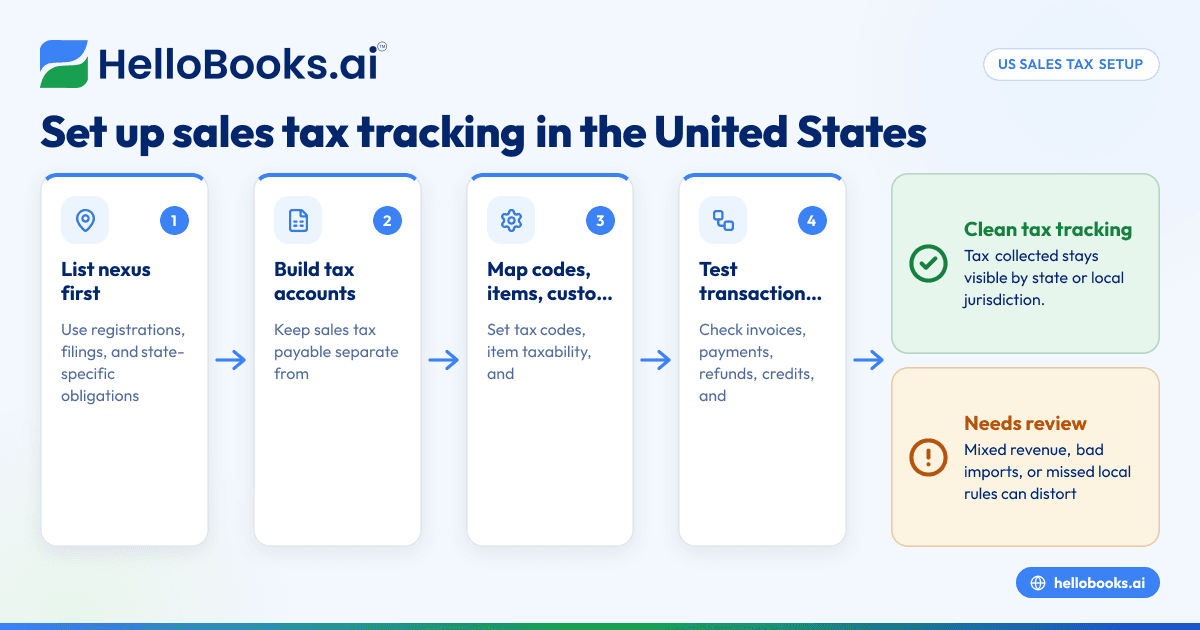
Start by defining where you have sales tax obligations, then map those obligations into your chart of accounts, tax codes, products, and customers. Your software should be ready before you send invoices or import sales.
Here is the order that works best for most US businesses.
1. List where you have nexus
You need to know where you are required to collect sales tax. That can depend on physical presence, employees, inventory, or economic nexus. Rules vary by state and can change.
Do not guess. Work from your registrations, prior filings, and advice from your tax professional. If you are unsure, get help before setup. This article is general information, not tax or legal advice.
Create a simple internal list with:
- State
- Registration status
- Start date for collection
- Filing frequency
- Notes on local taxes if relevant
This list becomes the source of truth for your accounting setup.
2. Create the right general ledger accounts
At a minimum, most businesses need:
- Sales revenue
- Sales tax payable
- Refunds or sales returns
- Discounts, if tracked separately
- Marketplace or channel clearing accounts, if used
Sales tax should post to a liability account, not to revenue. That sounds obvious, but many small businesses discover later that tax was included in sales totals because of a rushed setup or a bad import.
If you sell in multiple states, you can use either one sales tax payable account with reporting by tax code or separate liability accounts by state. The right approach depends on your filing volume and reporting needs. Simpler is often better, as long as reports stay clear.
3. Set up tax agencies and tax codes
Your software should let you assign tax agencies and tax rates or tax codes. Build these carefully. Name them in a way your team will understand later.
For example:
- Illinois state and local combined rate code
- Texas state and local combined rate code
- Michigan sales tax code
- Exempt resale code
- Out-of-scope or non-taxable code
Avoid vague labels like “Tax 1” or “Default tax.” They lead to mistakes during invoicing and cleanup work later.
4. Map product and service taxability
Not everything is taxed the same way. Some products are taxable. Some services may not be. Some items can vary by state. If you sell both physical products and services, this step matters even more.
Review your item list and decide:
- Taxable by default
- Non-taxable by default
- Needs review before sale
- Exempt when sold to certain customer types
Your software should let you assign a tax treatment at the item level. This prevents staff from having to decide tax treatment on every invoice from memory.
5. Set up customer tax status
Some customers are fully taxable. Some may provide valid exemption certificates. Others may have special billing arrangements. Your customer record should show the tax treatment clearly.
At minimum, track:
- Taxable or exempt status
- Exemption reason if applicable
- Certificate reference
- Effective date
- Expiration date if relevant
Do not store exemptions only in email. If the certificate is valid, the customer profile and invoice behavior should reflect it.
How do you track sales tax correctly in your books?
Track tax at the transaction level so each invoice, credit memo, refund, and payment flows into the right revenue and liability accounts. Your reports should then show sales tax collected separately from sales income.
Once the basics are in place, focus on transaction flow. This is where many setups break.
Invoice entry should do three things
Every taxable invoice should:
- Record revenue for the product or service sold.
- Calculate the correct sales tax.
- Post that tax to sales tax payable.
For example, if you invoice a customer in Houston for $1,000 of taxable goods and collect $82.50 in tax, your books should show:
- Revenue: $1,000
- Sales tax payable: $82.50
- Accounts receivable: $1,082.50
This keeps revenue clean and the liability visible.
Payments should clear receivables, not change tax
When the customer pays, the payment should reduce accounts receivable. It should not create new tax or adjust the tax amount unless you are also recording a correction.
A common mistake is posting deposits directly to income. That can make sales tax tracking unreliable because the software cannot connect the cash to the original taxed invoice.
Credit notes and refunds should reverse tax too
If you issue a refund or credit memo, the related tax should reverse in proportion to the refunded sale. If the software only reverses revenue, your tax payable account may stay too high.
Test this with a few sample transactions before going live. It is easier to fix now than during filing.
Imports from carts or payment tools need review
If you import sales summaries from order systems or card processors, check whether the import brings in gross sales, net payouts, fees, and tax correctly. A settlement deposit is not the same thing as a sales journal.
Your books need enough detail to answer:
- Gross taxable sales
- Non-taxable sales
- Exempt sales
- Sales tax collected
- Processor fees
- Refunds and chargebacks
Without that separation, reconciliation becomes guesswork.
Can ai sales tax tools help with setup?
Yes, but only if your underlying books are organized. ai sales tax features can help suggest tax treatment, flag inconsistencies, and reduce manual coding, but they do not replace a clean chart of accounts or a clear nexus review.
This is where modern software can help without overpromising. Teams often spend hours checking invoices, updating tax codes, and reviewing exceptions. Smarter automation can reduce that workload.
For example, software that uses automation or AI may help you:
- Apply the correct default tax code by item or customer
- Detect invoices with missing tax treatment
- Surface unusual changes in collected tax month over month
- Flag refunds that did not reverse tax properly
- Highlight customers marked exempt without supporting setup
That is useful, especially for lean finance teams. But no tool can fix messy item lists, duplicate customers, or an unclear filing footprint on its own.
If you are evaluating AI accounting software, look beyond marketing language. Ask whether it helps you maintain accurate books, clear reports, and repeatable month-end checks.
Recommended sales tax tracking workflow
A practical workflow keeps setup, daily bookkeeping, and review connected. Here is a process that works for many small and growing US businesses.
Step 1: Clean your item and customer masters
Before you turn on tax automation, review your product, service, and customer lists. Remove duplicates. Standardize names. Assign clear tax defaults.
This prevents random invoice behavior and makes reports easier to trust.
Step 2: Configure tax codes and liability accounts
Set up the tax rates, agencies, and ledger accounts you need. Use consistent naming. Decide who can create or edit tax codes.
Limit that access. Too many users changing tax settings creates hidden errors.
Step 3: Test common transaction scenarios
Run examples for:
- A normal taxable invoice
- A non-taxable sale
- An exempt customer sale
- A partial refund
- A credit memo after payment
- A discounted invoice
- A shipping charge, if you bill shipping separately
Review the journal impact for each one. Do not rely only on the invoice screen.
Step 4: Connect your bank and review cash flow
Bank feeds help you confirm collections and spot missing deposits or duplicated entries. They do not replace tax logic, but they support accurate books.
Tools like bank reconciliation software can make it easier to match deposits, refunds, and adjustments back to recorded sales activity.
Step 5: Reconcile monthly before filing
At month-end, compare:
- Taxable sales reports
- Sales tax liability reports
- Revenue reports
- Refund and credit memo reports
- Bank deposits and processor settlements
The goal is simple. Your books should tell one consistent story.
Common setup mistakes to avoid
Most sales tax tracking problems come from a few repeated errors.
Mixing tax with revenue
This is the biggest one. If tax is included in sales income, your revenue is overstated and the liability is understated or missing.
Using one default tax code for everything
This saves time at first, then creates cleanup work later. Different items and customers need different treatment.
Ignoring exempt customer documentation
If a customer is exempt, the accounting record should reflect that. So should your supporting files.
Posting payout deposits as sales
A payment processor or sales channel may deposit net cash after fees, refunds, or tax. Posting that deposit directly to revenue breaks reporting.
Forgetting local tax complexity
In some states, local rates matter. If your system setup ignores that, invoice tax can be off even when the state is correct.
Not reviewing changes over time
Your business changes. Products change. States change. Registrations change. Tax tracking is not a one-time setup.
What reports should you review every month?
Review a sales tax liability report, a sales by tax code report, and a reconciliation between gross sales, tax collected, refunds, and banked cash. If those reports do not align, fix the books before you prepare returns.
Here is a practical monthly review pack.
Sales tax liability report
This shows how much tax you collected and still owe. Review it by filing jurisdiction if your software supports that view.
Ask:
- Does the balance move in line with sales?
- Are there old balances that should have been remitted?
- Did refunds reduce the liability?
Sales by tax code report
This helps verify whether transactions were coded correctly. If a taxable product suddenly shows as non-taxable for a month, investigate.
Exempt sales report
Review exempt sales for reasonableness. Large jumps may mean staff selected the wrong customer type or tax code.
Revenue versus tax trend
Compare monthly revenue and tax collected. The ratio will not always be identical, but sharp changes often point to setup issues, changed sales mix, or new states.
Deposit and payout reconciliation
Match recorded customer payments and processor settlements to bank deposits. This confirms cash activity and supports cleaner month-end close.
If you are replacing spreadsheet-based workflows, AI bookkeeping can help automate some of this review, especially where teams spend time tracing missing entries and coding errors.
How HelloBooks can support cleaner compliance workflows
The best accounting process is the one your team will actually follow every week. That means fewer manual exports, fewer spreadsheet checks, and clearer reports.
HelloBooks is designed to reduce repetitive bookkeeping work for small businesses and finance teams. If you want better visibility into invoices, bank activity, expenses, and month-end reporting, it can help you build a cleaner accounting process around tax tracking too. Businesses that want simpler billing may also look at invoice software, while teams trying to reduce manual coding often benefit from expense management software.
The main goal is not just faster entry. It is better control. When the books are organized, sales tax tracking becomes easier to review, explain, and file.
If your current system feels too rigid or too manual, you may also want to compare a QuickBooks alternative built for simpler day-to-day accounting work.
A simple checklist for going live
Use this checklist before you rely on your new setup.
- Confirm where you are registered to collect sales tax
- Create or review sales tax liability accounts
- Set up tax codes with clear names
- Assign tax defaults to items and customers
- Enter exemption status and documentation references
- Test invoices, refunds, and credit memos
- Review the journal entries behind each test
- Connect bank feeds
- Reconcile one full month before filing from the system
- Lock down who can edit tax settings
This kind of discipline saves time later. It also makes handoffs easier if you work with an outside bookkeeper or need to find an accountant for review.
If you want to see how HelloBooks can simplify bookkeeping workflows and give you clearer reporting, you can book a demo or compare plans on the pricing page.
Frequently asked questions
Do I need separate sales tax accounts for every state?
Not always. Many businesses use one sales tax payable account and rely on tax code reporting for detail. If you file in many states or want simpler ledger review, separate accounts can help.
Can accounting software calculate sales tax automatically?
Many systems can calculate tax once rates, tax codes, items, and customer settings are configured correctly. Automatic calculation is only as good as the setup behind it.
Read next
This article covers one part of a bigger topic. For the complete picture, read our guide to sales tax.