
Key takeaways
What this article covers, in order:
- Login అయ్యే ముందే ఇది చేయండి
- మీరు నిజంగా ఏ GSTR-1 tables వాడతారు?
- దారి 1: GST portal లో మీరే ఫైల్ చేయడం
- దారి 2: మీ books నుంచి ఫైల్ చేయడం
- నిజంగా జరిగేలాంటి ఒక నెల: విశాఖపట్నంలో రమేష్
- ఇప్పుడు GSTR-1 ఇంతకుముందు కంటే ఎందుకు ఎక్కువ ముఖ్యం
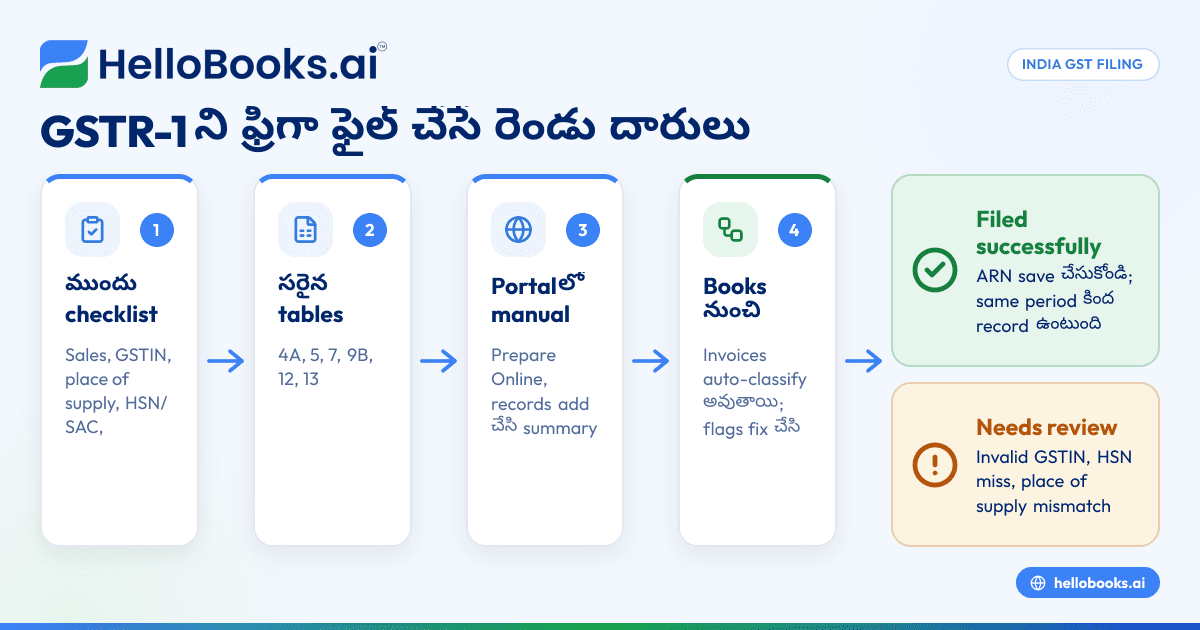
10వ తేదీ సాయంత్రం. ఈ నెలకి 23 invoices ఉన్నాయి, GST portal tab మాటిమాటికీ logout చేస్తోంది, రేపు GSTR-1 due date. కాస్త ఊపిరి తీసుకోండి. GSTR-1 ని రెండు విధాలుగా ఫ్రీగా ఫైల్ చేయొచ్చు: GST portal లో చేతితో, లేదా మీ invoices నుంచి నేరుగా portal కి ఫైల్ చేసే accounting సాఫ్ట్వేర్ ద్వారా. రెండింటినీ section వారీగా చూద్దాం.
Login అయ్యే ముందే ఇది చేయండి
నిజం చెప్పాలంటే, GSTR-1 తలనొప్పులు చాలావరకు portal ఓపెన్ చేయకముందే మొదలవుతాయి. ఈ లిస్ట్ మీద పదిహేను నిమిషాలు పెట్టండి, ఫైలింగ్ చాలా సులభం అవుతుంది.
- [ ] ఆ period లో జరిగిన ప్రతి sale రికార్డ్ అయింది, cash sales, marketplace sales తో సహా.
- [ ] ప్రతి B2B invoice మీద buyer సరైన 15-అక్షరాల GSTIN ఉంది.
- [ ] ప్రతి invoice మీద place of supply సరిగ్గా ఉంది.
- [ ] ప్రతి line కీ HSN లేదా SAC code ఉంది.
- [ ] ఈ period లో ఇచ్చిన credit notes, debit notes రికార్డ్ అయ్యాయి, original invoice కి link అయ్యాయి.
- [ ] Services కోసం advances తీసుకుని ఉంటే, వాటిని నోట్ చేశారు.
- [ ] మీ invoice number series లో కారణం తెలియని gaps లేవు.
- [ ] మీ registered mobile number మీ దగ్గరే ఉంది. OTP కావాలి.
ఆ place-of-supply line ని ఇంకోసారి చూడండి. మీరు IGST వేయాలా, CGST plus SGST వేయాలా అనేది అదే నిర్ణయిస్తుంది. Returns తప్పుగా వెళ్లడానికి మేము ఎక్కువగా చూసే ఒకే ఒక్క కారణం ఇదే.
మీరు నిజంగా ఏ GSTR-1 tables వాడతారు?
GSTR-1 లో చాలా tables ఉండటం వల్ల భయంగా కనిపిస్తుంది. మీరు వాడేవి కొన్నే.
| Table | దీనిలో ఏం వెళ్తుంది |
|---|---|
| 4A, 4B (B2B) | Registered buyers కి invoices, ఒక్కొక్కటిగా; reverse-charge supplies కూడా |
| 5 (B2CL) | Value limit దాటిన, unregistered buyers కి inter-state invoices (ప్రస్తుత నియమాల ప్రకారం ఒక్కో invoice కి ₹1 లక్ష; portal లో confirm చేసుకోండి) |
| 6A | Exports, IGST తో గానీ లేకుండా గానీ |
| 6B, 6C | SEZ units కి supplies, deemed exports |
| 7 (B2CS) | మిగతా అన్ని B2C sales, rate, place of supply వారీగా totals |
| 8 | Nil-rated, exempt, non-GST supplies |
| 9B | Credit notes, debit notes |
| 11 | తీసుకున్న, adjust చేసిన advances |
| 12 | HSN summary, B2B, B2C గా విడదీసి |
| 13 | ఇచ్చిన documents: invoice ranges, totals, cancellations |
| 14, 15 | E-commerce operators ద్వారా supplies |
ఇండియన్ కంపెనీలకి మాత్రమే bill వేసే ఫ్రీలాన్సర్ బహుశా 4A, 12, 13 tables మాత్రమే ముట్టుకుంటారు. నేరుగా వచ్చే కస్టమర్లకి అమ్మే మెడికల్ షాప్ ఎక్కువగా 7, 12, 13 లోనే ఉంటుంది. మిగతావి చూసి కంగారు పడకండి.
దారి 1: GST portal లో మీరే ఫైల్ చేయడం
ఇది ఫ్రీ, browser తప్ప ఇంకేమీ అక్కర్లేదు. కొన్ని invoices మాత్రమే ఉన్నప్పుడు ఇది బాగా సరిపోతుంది.
Return ఓపెన్ చేయండి. Login అయి, Services, తర్వాత Returns, తర్వాత Returns Dashboard కి వెళ్లండి. Financial year, period ఎంచుకుని GSTR-1 కింద Prepare Online క్లిక్ చేయండి. QRMP filers quarter ఎంచుకుంటారు. Quarter లో మొదటి రెండు నెలల్లో, దీనికి బదులుగా IFF tile కనిపిస్తుంది.
Sales ఉంటే, nil కి No చెప్పండి. మీరు nil return ఫైల్ చేస్తున్నారా అని portal ముందుగా అడగొచ్చు.
Table వారీగా invoices జోడించండి. B2B లో Add Record క్లిక్ చేసి buyer GSTIN, invoice number, తేదీ, value, place of supply, rate, taxable value టైప్ చేయండి. తర్వాతి invoice కి మళ్లీ అదే. దాని తర్వాతి దానికీ అదే. B2CS కోసం state వారీగా rate-wise totals ఎంటర్ చేస్తారు.
Invoices చాలా ఎక్కువగా ఉంటే, portal ఇచ్చే ఫ్రీ offline tool తో Excel template నింపి JSON ఫైల్ upload చేయొచ్చు. టైపింగ్ తగ్గుతుంది, కానీ బదులుగా download-fill-convert-upload చక్రంలో టైమ్ పోతుంది.
12, 13 tables ని వదిలేయకండి. HSN summary కి HSN/SAC code వారీగా మీ sales కావాలి. Documents table కి మీ invoice number range, మొత్తం ఇచ్చినవి, cancel అయినవి కావాలి. జనం వీటిని ఎప్పుడూ మర్చిపోతారు, తర్వాత తమ return ఎందుకు flag అయిందని ఆశ్చర్యపోతారు.
Summary generate చేసి preview చూడండి. Generate GSTR-1 Summary క్లిక్ చేసి, తర్వాత Preview. Draft PDF download చేసి, దాని totals ని మీ sales register తో పోల్చండి. నంబర్లు match కాకపోతే, ఆగి ఎందుకో కనుక్కోండి.
ఫైల్ చేయండి. Declaration టిక్ చేసి, authorised signatory ఎంచుకుని EVC (మీ registered mobile, email కి OTP) లేదా DSC తో ఫైల్ చేయండి. కంపెనీలు DSC నే వాడాలి, మీ GSTIN కి అనుమతి ఉన్న options మాత్రమే portal చూపిస్తుంది. ఫైల్ అయిపోగానే స్క్రీన్ మీద ARN వస్తుంది. Screenshot తీసుకోండి, సేవ్ చేయండి, మీకు మీరే email చేసుకోండి.
దారి 2: మీ books నుంచి ఫైల్ చేయడం
మీ invoices ఇప్పటికే నేరుగా ఫైల్ చేసే సాఫ్ట్వేర్లో ఉంటే, పైన చెప్పిన వాటిలో చాలావరకు అవసరం ఉండదు.
మీరు ఆ నెల లేదా quarter కి GSTR-1 స్క్రీన్ ఓపెన్ చేస్తారు. సాఫ్ట్వేర్ ఇప్పటికే ప్రతి invoice ని B2B, B2CL, B2CS, exports, credit notes, HSN summary, documents issued లో పెట్టేసింది. అది flag చేసినవి చూస్తారు. సాధారణంగా validation లో fail అయిన GSTIN, మిస్ అయిన HSN code, లేదా వేసిన tax తో match కాని place of supply. వాటిని సరిచేసి, totals ఒకసారి చూసి ఫైల్ చేస్తారు. ARN తిరిగి వచ్చి ఆ period కింద సేవ్ అవుతుంది.
అసలు లాభం వేగం కాదు, అది కూడా బాగుంటుంది అనుకోండి. ఒకే invoice రికార్డ్ మీ books కీ, మీ return కీ రెండింటికీ వెళ్తుంది. రెండూ ఒకదానికొకటి దూరం కావు.
నిజంగా జరిగేలాంటి ఒక నెల: విశాఖపట్నంలో రమేష్
రమేష్ విశాఖపట్నంలో ఒక చిన్న షాప్ నుంచి హ్యాండిక్రాఫ్ట్స్ అమ్ముతాడు, monthly గా ఫైల్ చేస్తాడు. ఇది ఒక ఉదాహరణ మాత్రమే, కానీ అతని Sep 2026 చాలా మామూలు నెల.
ఆంధ్రప్రదేశ్ లోని registered షాపులకి ఆరు invoices, కాబట్టి CGST, SGST. తెలంగాణలోని registered షాపులకి రెండు invoices, IGST తో. ముంబైలోని ఒక unregistered buyer కి ₹1,40,000 invoice ఒకటి, ఇది limit దాటిన inter-state B2C. టూరిస్టులకి ₹62,000 కౌంటర్ sales, 12% తో. ఇంకా పగిలిన దీపాన్ని తిరిగి పంపిన తెలంగాణ షాప్కి ఒక credit note.
Sep 2026 కి అతని GSTR-1 due date 11 అక్టోబర్ 2026. ఎనిమిది invoices 4A లోకి వెళ్తాయి. ముంబై invoice table 5 లోకి. కౌంటర్ sales ఒకే line గా 7 లోకి. Credit note 9B లోకి. తర్వాత HSN, documents tables.
ఫైల్ చేసిన రెండు రోజుల తర్వాత, ఒక ఆంధ్రప్రదేశ్ invoice లో GSTIN లో ఒక digit తప్పుగా ఉందని గమనిస్తాడు. చిరాకే, కానీ సరిచేయొచ్చు. Sep 2026 GSTR-3B ఫైల్ చేసే ముందు GSTR-1A ద్వారా సరిచేయొచ్చు, లేదా తర్వాతి GSTR-1 లో amend చేయొచ్చు.
ఇప్పుడు GSTR-1 ఇంతకుముందు కంటే ఎందుకు ఎక్కువ ముఖ్యం
July 2025 tax period నుంచి, GSTR-3B లో sales liability నేరుగా GSTR-1, IFF, GSTR-1A నుంచి వస్తుంది, మీరు దాన్ని edit చేయలేరు. GSTR-1 లో ఏం report చేస్తారో, GSTR-3B లో అదే కడతారు. ఒక invoice మిస్ అయితే తక్కువ కడతారు, తర్వాత interest వస్తుంది. ఒకటి రెండుసార్లు report చేస్తే, సరిచేసే వరకు ఎక్కువ కడుతూ ఉంటారు.
మీ buyers కూడా తమ Invoice Management System లో మీ invoices చూస్తారు, అక్కడ ప్రతి దాన్నీ accept లేదా reject చేయొచ్చు. ఒక buyer invoice ని reject చేస్తే, ఫోన్ చేయండి. దాని మీద ఏదో సరిచేయాల్సి ఉండొచ్చు.
మీకు ఎదురయ్యే errors, ఏం చేయాలి
| మీకు కనిపించేది | ఏం చేయాలి |
|---|---|
| B2B record మీద "Invalid GSTIN" | Portal లో Search Taxpayer తో GSTIN చెక్ చేసి, సరిచేయండి |
| Tax type, place of supply తో match కావడం లేదు | Inter-state అంటే IGST; intra-state అంటే CGST + SGST. Invoice సరిచేయండి |
| HSN summary, invoice totals తో match కావడం లేదు | ప్రతి invoice line కీ HSN/SAC code ఉందని నిర్ధారించుకోండి |
| ఫైల్ చేసిన తర్వాత ఒక invoice మర్చిపోయారు | GSTR-3B కి ముందు GSTR-1A ద్వారా, లేదా తర్వాతి GSTR-1 లో జోడించండి |
| తప్పు period కి ఫైల్ చేశారు | ఫైల్ అయిన returns ని delete చేయలేరు; తర్వాతి GSTR-1 లో amendments ద్వారా సరిచేయండి |
LUT కింద exports, SEZ supplies, లేదా పోగుపడిన పాత amendments ఉన్నప్పుడు, ఫైల్ చేసే ముందు ఒక CA కి చూపించడం మంచిది.
HelloBooks ఎలా సహాయపడుతుంది
HelloBooks మీరు అందులో వేసే invoices నుంచి GSTR-1 తయారు చేసి, HelloBooks లోపల నుంచే నేరుగా GST portal కి ఫైల్ చేస్తుంది. JSON లేదు, మళ్లీ upload లేదు. Free plan లో ఒక GSTIN కి GSTR-1 ఫైలింగ్ అపరిమితం, ₹0 కి, card అవసరం లేదు, expiry లేదు.
మీ invoices మొదటి నుంచే HSN/SAC codes, place of supply తో ఉంటాయి, దాంతో HSN table, tax split సరిగ్గా ఉంటాయి. Free లో 2 users, సంవత్సరానికి 200 transactions వరకు ఉంటాయి, మీ CA ని అదే books లోకి invite చేయొచ్చు. GSTR-1 ఫైలింగ్ page లో స్క్రీన్-బై-స్క్రీన్ వివరణ ఉంది. Codes గురించి సందేహం ఉంటే మా HSN, SAC గైడ్ సహాయపడుతుంది.
తరచుగా అడిగే ప్రశ్నలు (FAQs)
GSTR-1 due date ఎప్పుడు?
Monthly filers తర్వాతి నెల 11వ తేదీలోపు ఫైల్ చేస్తారు, అంటే Oct 2026 కి 11 నవంబర్ 2026. QRMP filers quarter తర్వాత 13వ తేదీలోపు ఫైల్ చేస్తారు, అంటే Oct–Dec 2026 quarter కి 13 జనవరి 2027. Extensions కోసం portal చెక్ చేయండి.
సాఫ్ట్వేర్ లేకుండా GSTR-1 ఫైల్ చేయొచ్చా?
చేయొచ్చు. Invoices ని నేరుగా portal లో టైప్ చేయొచ్చు, లేదా ఎక్కువ ఉంటే ఫ్రీ offline tool తో upload చేయొచ్చు. సాఫ్ట్వేర్ ఎక్కువగా టైమ్ని, టైపింగ్ తప్పుల్ని ఆదా చేస్తుంది.
ఫైల్ చేసిన GSTR-1 ని revise చేయొచ్చా?
Revise కాదు, కానీ సరిచేయొచ్చు. అదే period కి, ఆ period GSTR-3B ఫైల్ చేసే ముందు GSTR-1A వాడండి, లేదా తర్వాతి GSTR-1 లో amendment report చేయండి.
Sales లేకపోయినా GSTR-1 ఫైల్ చేయాలా?
అవును, nil GSTR-1 గా. Portal లో గానీ, మీ registered mobile నుంచి SMS ద్వారా గానీ చేయొచ్చు.
ఫైల్ చేయడానికి OTP సరిపోతుందా, లేక DSC కావాలా?
Proprietors, partnerships, ఇంకా చాలామంది taxpayers EVC (OTP) తో ఫైల్ చేయొచ్చు. కంపెనీలు DSC నే వాడాలి. మీ GSTIN ఏ options వాడొచ్చో filing స్క్రీన్ చూపిస్తుంది.
వీలైతే 9వ లేదా 10వ తేదీకే ఫైల్ చేయండి. మిగతా ఇండియా అంతా portal మీద లేనప్పుడు అది చాలా బాగా పనిచేస్తుంది.
ఫ్రీగా మొదలుపెట్టండి — GST ఫైలింగ్ కలిపే, card అవసరం లేదు. HelloBooks ఫ్రీగా ట్రై చేయండి